ActiveCampaign vs Drip: Cost, Automation and CRM Compared
ActiveCampaign vs Drip: who should pick which, prices at 1,000, 5,000 and 10,000 contacts, automation limits by plan, segmentation and migration steps.
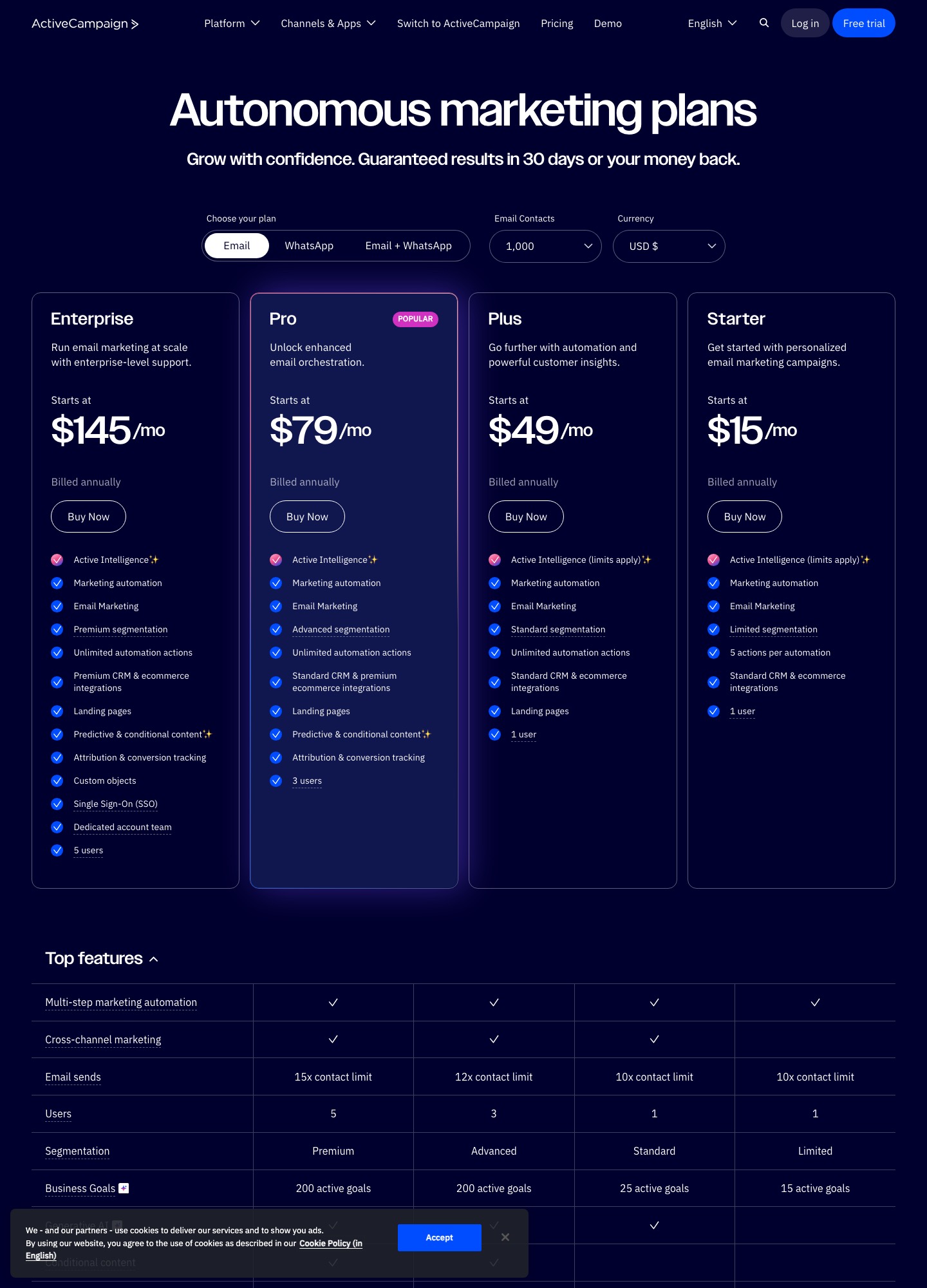
Pick Drip if you sell through an online store and want carts, browsing and orders to start your sequences, with one price that follows your list size and unlimited email sends. Pick ActiveCampaign if your emails hand people over to a sales team, so deals, tasks and lead scores sit beside the automations, or if you want a $15 starting plan. At 5,000 contacts the pricing pages read $79 for ActiveCampaign Starter, $145 for Plus and $89 for Drip. Starter caps every automation at 5 actions, so the fair match for Drip is Plus, which costs more at every list size read up to 25,000.
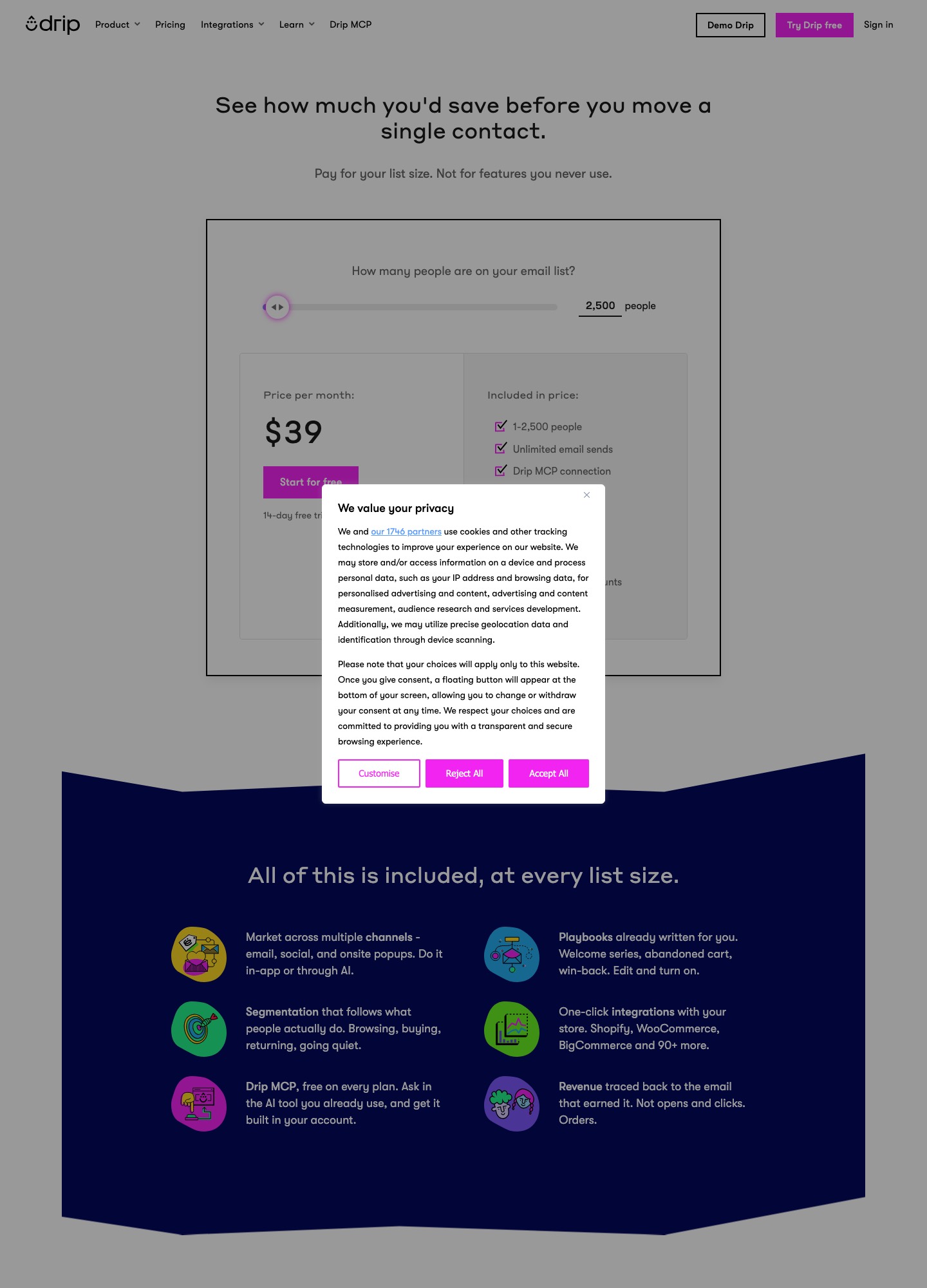
Both prices below come from ActiveCampaign's pricing page and Drip's pricing page, read on 7 October 2026. ActiveCampaign quotes every plan as billed annually, and Drip's slider reads "Price per month", so the numbers show the shape of each bill rather than a perfectly matched basket.
ActiveCampaign and Drip side by side
| ActiveCampaign | Drip | |
|---|---|---|
| What the price follows | Contacts selected, in four plans; email sends capped at 10x, 12x or 15x the contact limit | Active people on the list and the email volume of the month; the readouts up to 30,000 people say unlimited sends |
| Entry price | At 1,000 contacts: Starter $15, Plus $49, Pro $79, Enterprise $145, billed annually | $39 a month for 1 to 2,500 people |
| Free option | Free trial; no free plan | 14-day trial, no card; unlimited emails are not available during the trial |
| Automation limit | Starter: 5 actions per automation. Plus and above: unlimited actions | Up to 50 workflows per account; the pages we read give no per-workflow step limit |
| Segmentation | Limited, standard, advanced or premium depending on plan; tags and saved segments on every plan | Dynamic segments built from products viewed, orders, amount spent, tags and engagement |
| Store integrations named | Shopify, Square and WooCommerce on every plan; BigCommerce, Magento and Shopify Plus from Pro | Shopify, WooCommerce, BigCommerce and 90+ more |
| CRM and deals | Pipelines and sales-engagement add-ons on Plus and above; price not on the page | None listed on the pricing page |
| Onsite messages | Site messages and landing pages from Plus | Onsite campaigns in the displayed plan |
| Users | 1 on Starter and Plus, 3 on Pro, 5 on Enterprise | Not stated on the pricing page |
| Moving in | Basic onboarding and migration support on Starter and Plus, priority on Pro and Enterprise | Migration service for lists above 17,500 people, with onboarding support for the first 90 days |
What each plan includes for automations
ActiveCampaign sells depth by plan, and the cap that matters most sits on the cheapest one. The pricing page's feature grid gives Starter "5 actions per automation", while Plus, Pro and Enterprise read "Unlimited actions". If each email, wait and tag counts as an action, a welcome email, a two-day wait, a follow-up and a tag already use four of the five, so a branching onboarding flow is unlikely to fit. That is why this page treats Plus, not Starter, as the like-for-like plan against Drip.
| ActiveCampaign plan | Automation and segmentation | Ecommerce and reporting | Sends and users |
|---|---|---|---|
| Starter, $15 at 1,000 | 5 actions per automation; limited segmentation; forms standard and inline only; no landing pages; cross-channel is email only | Abandoned cart and standard store integrations; no product catalog and blocks, no coupons, no revenue or ecommerce reporting | 10x contacts; 1 user |
| Plus, $49 at 1,000 | Unlimited actions; standard segmentation; landing pages and site messages; custom event tracking; sales automation; A/B testing for email only | Adds product catalog and blocks, coupons, revenue and ecommerce reporting, and a PayPal and Stripe integration | 10x contacts; 1 user |
| Pro, $79 at 1,000 | Advanced segmentation; conditional content; predictive sending; automations map; A/B testing inside automations | Adds attribution and conversion tracking, recurring payments, and BigCommerce, Magento and Shopify Plus integrations | 12x contacts; 3 users; priority support |
| Enterprise, $145 at 1,000 | Premium segmentation; custom objects; single sign-on | Adds Salesforce and Microsoft Dynamics integrations | 15x contacts; 5 users; dedicated account team and uptime SLA |
Everything in that table is read from the comparison grid on ActiveCampaign's pricing page; where the grid shows no entry for a plan, the table treats the feature as not included. Two cautions apply. The plan cards at the top of the page are shorter than the grid, so check the grid for any feature you depend on. And the grid is the place where the two CRM add-ons appear, which the CRM section below returns to.
Drip's page is shorter because it sells one bundle. The included list beside the price slider names unlimited email sends, dynamic segments, onsite campaigns, up to 50 workflows, unlimited sub-accounts, open API access, free migration, personalized onboarding and Drip's MCP connection for AI clients. Drip's automation page explains the 50: "we limit to 50 workflows per Drip account", and it describes more than 20 ecommerce workflow templates for welcome series, abandoned cart, abandoned browse, post-purchase and win-back. The same answer says you "shouldn't need more than 50 active workflows at once", and the page lists "rules" as a lighter way to automate one trigger followed by one action.
Reporting depth is another place where plans diverge. Drip's pricing page says revenue is traced back to the email that earned it, in orders rather than opens and clicks, and the feature is part of the one bundle. On ActiveCampaign the grid gives revenue and ecommerce reporting to Plus and above and attribution and conversion tracking to Pro and Enterprise, so the equivalent of "which email earned this order" is a Plus-or-Pro question rather than something every plan has.
Ecommerce depth: Drip's centre, an ActiveCampaign plan ladder
Drip describes itself, in its own FAQ, as built specifically for ecommerce, and its segmentation page says that once you connect Shopify, WooCommerce, BigCommerce or a custom store you can segment on purchase history and products viewed. The trigger set on its automation page is customer actions across the store: buying, browsing and clicking. For a shop that wants an abandoned-browse flow, a second-purchase flow and a win-back flow without paying more for each, the single bundle is the point of the product.
ActiveCampaign covers the same ground in steps. Abandoned cart is listed on all four plans, and "Ecommerce automation" is checked on all four. Product catalog and blocks and coupons start at Plus, which also adds ecommerce reporting. The BigCommerce, Magento and Shopify Plus integrations start at Pro, along with recurring payments. A WooCommerce or Shopify store on Starter can therefore run a cart-recovery sequence within the 5-action cap but cannot drop a product block or a coupon into the email, and has no ecommerce report to judge it by. Those items are the ones that tend to decide whether a store stays on Starter.
Where ActiveCampaign is ahead for a store is breadth beyond the store: its grid lists 1,000+ integrations, landing pages on Plus and above, and ads integrations for Google, Facebook and LinkedIn. Drip's pricing page counts Shopify, WooCommerce, BigCommerce "and 90+ more", and its automation page describes syncing Facebook Custom Audiences with Drip segments for retargeting. The catalogue is smaller and store-centred.
If you sell subscriptions rather than products
Drip's FAQ says a store is not required, and its Stripe integration page lists concrete actions: add a tag when a payment completes, remove a tag when a charge is refunded (partial refunds included), subscribe someone to a cart-recovery campaign when a payment attempt fails, and subscribe someone to a campaign when a customer signs up for a new plan. ActiveCampaign's grid lists a PayPal and Stripe integration from Plus upward, but the pricing page does not describe which Stripe events can start an automation. If a failed-payment sequence is your main need, the Stripe page makes Drip easier to evaluate on paper, and the 14-day trial lets you confirm the event reaches a workflow before you pay.
CRM and sales automation depth
This is where the two products stop being substitutes. ActiveCampaign's sales CRM page lists sales pipelines described as customizable, visual workflows that track every opportunity, task management, lead scoring and sales routing. The pricing page then sorts these into add-ons: a Pipelines add-on that carries pipeline management, deal records, account records and lead scoring, and a Sales engagement add-on that adds automated one-to-one email and win probability. The grid offers both add-ons on Plus, Pro and Enterprise and offers neither on Starter. It publishes no price for either, so a team that needs deals should get the add-on cost from ActiveCampaign before comparing totals with Drip.
The "Sales automation" row is separate: it is checked on Plus, Pro and Enterprise and blank on Starter. So a Starter account is an email tool with contact records, tags and fields, and the deal-handling side of ActiveCampaign begins at Plus plus an add-on. Enterprise adds custom objects plus Salesforce and Microsoft Dynamics integrations.
Drip's pricing page lists none of this: no pipeline, no deal stage, no task list. What it does carry on each person is a lead score and a lifetime value, as the fields in its export article show, and its integrations catalogue has CRM and Sales categories. The realistic Drip setup for a business with a sales team is Drip for the marketing sequences and a separate CRM for deals, joined through an integration. That is cheaper to start and gives the sales team a purpose-built tool, at the cost of two systems and a sync to maintain.
Segmentation and tagging
ActiveCampaign gates segmentation by plan. The grid reads limited on Starter, standard on Plus, advanced on Pro and premium on Enterprise, and it adds that Starter holds up to 5 lists. Contact profiles, custom fields, tags, saved segments, AI-suggested segments and personalization fields are listed on all four plans. Conditional content, which swaps parts of an email for different segments, starts at Pro. In practice the Starter-to-Plus step is the one that matters for a small team, because Plus is where the 5-action cap disappears, and Pro is where you can personalise inside the email itself.
Drip's segmentation page describes dynamic segments as real-time and "not list-based like other platforms": someone who buys a second time leaves a one-time-buyer segment automatically. It lists products viewed, orders placed, amount spent, tags and email engagement as segment inputs, and says tags are binary markers used to build segments, such as "used a discount". Its suggested starting set is four segments: non-purchasers, first-time purchasers, repeat purchasers and loyal high spenders. The pricing page says dynamic segments come "at every list size".
The practical difference shows up in maintenance. In ActiveCampaign you decide which of lists, tags and segments hold a person and keep them consistent; the plan you pay for sets how detailed a segment can get. In Drip the store data feeds the segment and people move on their own, so a tag is the manual exception rather than the main mechanism. If your tagging is mostly "who bought what", Drip's model saves effort. If your tagging reflects sales stages and manual qualification, ActiveCampaign's lists, tags and deals fit that habit better.
What they cost at 1,000, 5,000 and 10,000 contacts
The two vendors count differently: ActiveCampaign prices the number of contacts selected on its page, Drip the "active people" in the account. The table treats one contact as one person. ActiveCampaign figures are the email-plan readouts, billed annually; Drip's slider reads "Price per month" and the text we read names no billing term, so confirm at checkout whether a monthly or annual price applies before comparing totals.
| Contacts or people | ActiveCampaign Starter | ActiveCampaign Plus | ActiveCampaign Pro | Drip | Plus minus Drip |
|---|---|---|---|---|---|
| 1,000 | $15 | $49 | $79 | $39 (smallest slider band, 1 to 2,500) | 49 - 39 = 10 more |
| 5,000 | $79 | $145 | $205 | $89 | 145 - 89 = 56 more |
| 10,000 | $149 | $189 | $375 | $154 | 189 - 154 = 35 more |
All figures are US dollars per month. Over a year, the 5,000-contact gap between Plus and Drip is 56 x 12 = 672, since $145 x 12 = $1,740 and $89 x 12 = $1,068. At 10,000 contacts it is 35 x 12 = 420, from $189 x 12 = $2,268 against $154 x 12 = $1,848. Starter at 10,000 would be $149 x 12 = $1,788, which is $60 a year below Drip (1,848 - 1,788), but that is the plan with 5 actions per automation, 1 user and limited segmentation. If you do need Pro's conditional content and attribution, the same 10,000 contacts cost $375 against $154 on Drip, a gap of 375 - 154 = 221 a month.
The rest of the price ladder
ActiveCampaign's selector and Drip's slider both give more readings, and they show where the lines cross. Starter equals Drip at 2,500, stays below it through 10,000, and is above it from 15,000 ($231 against $209), then stops being offered above 25,000 contacts. Plus stays above Drip until 50,000.
| Contacts or people | ActiveCampaign Starter | ActiveCampaign Plus | ActiveCampaign Pro | Drip |
|---|---|---|---|---|
| 2,500 | $39 | $95 | $149 | $39 |
| 7,500 | $109 | $169 | $289 | $124 |
| 15,000 | $231 | $265 | $465 | $209 |
| 20,000 | $311 | $329 | $549 | $289 |
| 25,000 | $391 | $389 | $629 | $369 |
| 50,000 | Not offered above 25,000 | $609 | $969 | $699 (button changes to Book a demo) |
Two readings are worth noticing. At 25,000 contacts ActiveCampaign Plus ($389) is $2 cheaper than Starter ($391), so there is no reason to buy Starter at that size. And at 50,000 the order reverses: Plus at $609 is 699 - 609 = 90 below Drip, though Drip's reading at that size lists 600,000 email sends, which is 600,000 / 50,000 = 12 per person, while Plus allows 10 x 50,000 = 500,000.
When sending volume changes the answer
Drip's page says the cost is based on active people "and the volume of emails you send during the month", but the readouts through 30,000 people list unlimited sends, and the 40,000 and 50,000 readings list 480,000 and 600,000 sends. ActiveCampaign's allowance is always a multiple of the contact limit: 10x on Starter and Plus, 12x on Pro and 15x on Enterprise. That matters for a store that mails often.
- 10,000 people, 4 emails each. 4 x 10,000 = 40,000 sends, well inside Plus's 10 x 10,000 = 100,000. Plus ($189) against Drip ($154) is the ordinary 35 gap.
- 10,000 people, 12 emails each. 12 x 10,000 = 120,000 sends, which is above Plus's 100,000 and only just fits Pro's 12 x 10,000 = 120,000. The plan that covers the volume is Pro at $375, against $154 on Drip, a gap of 221 a month. The page does not say what happens above an allowance, so ask ActiveCampaign before sending past it.
- 2,500 people. Drip's $39 band is the same price as ActiveCampaign Starter ($39) and $56 below Plus (95 - 39), so a small list that needs more than 5 actions per automation is where Drip's bundle is the clearest saving.
Support and onboarding add small differences. Drip's FAQ says paying customers have email support Monday to Friday and that live chat is available on plans of $99 a month and up. ActiveCampaign's grid gives email and chat support at a basic level on Starter and Plus and a priority level on Pro and Enterprise, with the same split for onboarding and migration support.
Choose ActiveCampaign if
- People work deals. You want pipelines, deal records and lead scoring tied to the contact, and you accept that these arrive through add-ons on Plus or above, with a price you still have to ask for.
- You want to start at $15. Your sequences are a welcome email and a short follow-up for about 1,000 contacts, and one user is enough. Starter at $15 against Drip's $39 is 39 - 15 = 24 a month less at 1,000 contacts.
- Your selling is not only through a store. You rely on landing pages, forms, ads integrations or the 1,000+ integrations the grid lists, and Shopify or WooCommerce are one channel among several.
- You need depth by role. Several people build automations (Pro includes 3 users, Enterprise 5), and you want conditional content, an automations map or custom objects as you grow.
- You are at 50,000 contacts. The reading for Plus ($609) is below Drip's ($699).
Choose Drip if
- You run a store. Carts, browsing, repeat purchases and revenue by email are the product's centre, with prebuilt templates for each, on Shopify, WooCommerce or BigCommerce.
- You want a flat bundle. Unlimited sends at the readouts through 30,000 people, dynamic segments, onsite campaigns and 50 workflows without buying a plan ladder, which saves $56 a month at 5,000 contacts against Plus.
- Your list is 2,500 to 25,000 people. In that range Drip's reading is below ActiveCampaign Plus at every size we read, by between $20 (25,000) and $56 (2,500, 5,000 and 15,000).
- Segments should maintain themselves. You want a purchase to move a person between segments without a manual tag.
- Your CRM is already elsewhere. A sales tool that already holds deals makes ActiveCampaign's CRM add-ons a cost you would not use.
Neither fits if the job is something else. A B2B team that lives in a sales CRM should compare HubSpot and ActiveCampaign or Keap and ActiveCampaign; a store owner leaning on ActiveCampaign-style automation but comparing store-first tools can read Klaviyo versus ActiveCampaign; and Encharge versus Drip and Customer.io versus Drip cover SaaS-style, event-driven setups. The wider lists are Drip alternatives and ActiveCampaign alternatives.
Moving from Drip to ActiveCampaign
The vendors' own articles describe a data move, not an automation move. ActiveCampaign's switching page lists automated migration of contacts, templates, automations and forms for Mailchimp, "expanding to more platforms soon", so for Drip the path is a CSV out and a CSV in.
- Export people by segment. Drip's export article says to go to People, then Active, filter to the segment you want or leave the filter blank, then choose Actions and Export to CSV. A link to the file is emailed to the logged-in address. The file includes email address, status (active or unsubscribed), tags, email series campaign names, lead score, lifetime value, user ID and custom fields. Exporting one file per tag group makes the next step easier.
- Check what will not travel. The same article says an account export holds templates, the people list and email series campaigns, and that emails created with the visual email builder and events are not exportable. It does not list workflows. Write down each workflow's trigger, waits, branches and exit rules before cancelling anything.
- Create the lists first. ActiveCampaign's CSV import article says it is not possible to create a list during the import, so create each list beforehand. Remember that Starter allows up to 5 lists.
- Load unsubscribed people before the rest. Drip's file has a status column, so split it. The import tool offers "Import as Unsubscribed Contact" and "Import as Excluded Email Address" options when a list is selected, so a person who opted out in Drip is recorded as unsubscribed before any send goes out.
- Turn off Trigger Automations while you import. The article warns that contacts may be added to automations set to Active when the list or tag used in the import is part of a trigger, and the Advanced Options let you switch that off. Do this until the rebuilt flows are reviewed.
- Apply tags at import. The tool can tag every contact in the file as it lands, so a Drip segment export becomes an ActiveCampaign tag in one step. Keep a source tag so the batch is easy to find later.
- Rebuild workflows and onsite campaigns. Recreate each Drip workflow as an ActiveCampaign automation; the pricing page says 950+ automation recipes are available on every plan, and Starter's 5-action cap applies. The nearest feature to Drip's onsite campaigns is site messages, which begin at Plus. Connect the store through the standard integration for Shopify, WooCommerce or Square, or BigCommerce if you are on Pro.
- Trim before you count. The ActiveCampaign price follows the contact count you select, so leave out people who have not engaged in a long time.
Moving from ActiveCampaign to Drip
- Export contacts with their tags. ActiveCampaign's export article says to click Contacts, open the ellipsis menu, choose Export, pick the fields and download the file from the Exports page, where the link is valid for 7 days. The CSV has columns for custom fields, lead scores and deal scores, with each contact's tags in a single column. Contact notes cannot be exported.
- Handle deals separately. Drip's pricing page lists no deal pipeline, so decide where open deals go before you cancel. The contact export carries a deal-score column, but we did not read an article on exporting the deals themselves, so check ActiveCampaign's help centre for that.
- Format the file for Drip. Drip's import article asks for lowercase column headings with underscores, such as first_name and last_name, a tags column with comma-separated tags, one column per custom field, and lifetime value in cents. Files must be CSV and accounts created after June 2, 2020 are limited to 200,000 rows per upload.
- Import subscribed and unsubscribed people separately. The article recommends two imports, because unsubscribes do not carry over automatically; for the unsubscribed file it tells you to choose More Actions, then Unsubscribe a person, then All mailings, before adding the people.
- Check the list you are importing. The same article notes that list imports are subject to approval and asks whether you have consent and whether the list has engaged in the past six months.
- Ask about free migration if the list is large. Drip's migration page says that for lists above 17,500 people it will migrate you and provide onboarding for the first 90 days. It lists people with their tags, custom fields and segments, up to 3 email templates and up to 3 onsite campaigns per account, and workflows capped at 5 active ones per account for lists under 80,000, with all active workflows migrated from 80,000 up. Below 17,500 people the page promises no service, so you do the import yourself.
- Reconnect the store and rebuild flows. Drip's setup, per its FAQ, is three steps: connect the store, import the list and activate a campaign or workflow. Start from the abandoned-cart and welcome templates and compare them with what ActiveCampaign was sending.
One general point for both directions: keep the old account running until the new flows have sent and the unsubscribe handling has been checked on a few known addresses. For wider guidance on switching, see the email sequence tools migration guide.
Frequently asked questions
Is ActiveCampaign or Drip cheaper?
ActiveCampaign Starter is the cheapest entry on either pricing page, at $15 a month for 1,000 contacts, and it still undercuts Drip at 5,000 ($79 against $89) and at 10,000 ($149 against $154). But Starter caps each automation at 5 actions, so the plan that matches Drip's automation is Plus, and Plus costs more than Drip at every size we read up to 25,000 contacts: $145 against $89 at 5,000, and $189 against $154 at 10,000. At 50,000 the order flips, with Plus at $609 and Drip at $699.
Does Drip have a CRM like ActiveCampaign's?
Drip's pricing page lists no pipelines, deal records, tasks or lead-routing features, and its integrations catalogue has a CRM category for connecting an outside system. ActiveCampaign's sales CRM page lists pipelines, task management and lead scoring, although the pricing page places pipeline management, deal records and lead scoring in a Pipelines add-on that is offered on Plus, Pro and Enterprise and is not offered on Starter. The add-on price is not on that page, so ask before you budget for it.
Is Drip only for online stores?
No, but its own FAQ says it is built specifically for ecommerce and that you get the most out of it if you run an online store. Drip's Stripe integration page lists actions such as adding a tag when a payment completes and subscribing someone to a campaign when a customer signs up for a new plan or a payment attempt fails. If you sell subscriptions, run that flow through the 14-day trial first, because the pricing page does not describe subscription triggers beyond the integration list.
Can I move from Drip to ActiveCampaign automatically?
Not on the evidence of the vendor pages. ActiveCampaign's switching page lists automated migration of contacts, templates, automations and forms for Mailchimp only, and Drip's export article says emails built in the visual email builder and events are not exportable. Plan on a CSV export from Drip, a CSV import into ActiveCampaign, and a hand rebuild of every workflow.