Keap vs ActiveCampaign for Email Sequences
Keap vs ActiveCampaign for email sequences: what each automates, prices at 1,000, 5,000 and 10,000 contacts, who should pick which, and migration.
Keap is a CRM and small-business suite in which email and text sequences sit next to quotes, invoices, payments and appointment booking, sold as one platform whose price rises with your contact count. ActiveCampaign is an email-automation product with a CRM attached, sold as four plans that differ mainly in automation depth and users. Pick Keap if you run a service business and want billing and booking in the same system as your follow-up sequences; pick ActiveCampaign if the sequences themselves are the job and the budget matters. On the vendors' own pages, 5,000 contacts reads $449 a month on Keap's pricing page and $145 on ActiveCampaign's Plus plan.
The two tools side by side
| Keap | ActiveCampaign | |
|---|---|---|
| How it is sold | One platform with every feature; price steps up with contacts | Starter, Plus, Pro and Enterprise plans; price steps up with contacts |
| Entry price | $299/mo at 1,500 contacts and 2 users, billed monthly | $15/mo (Starter) or $49/mo (Plus) at 1,000 contacts, billed annually |
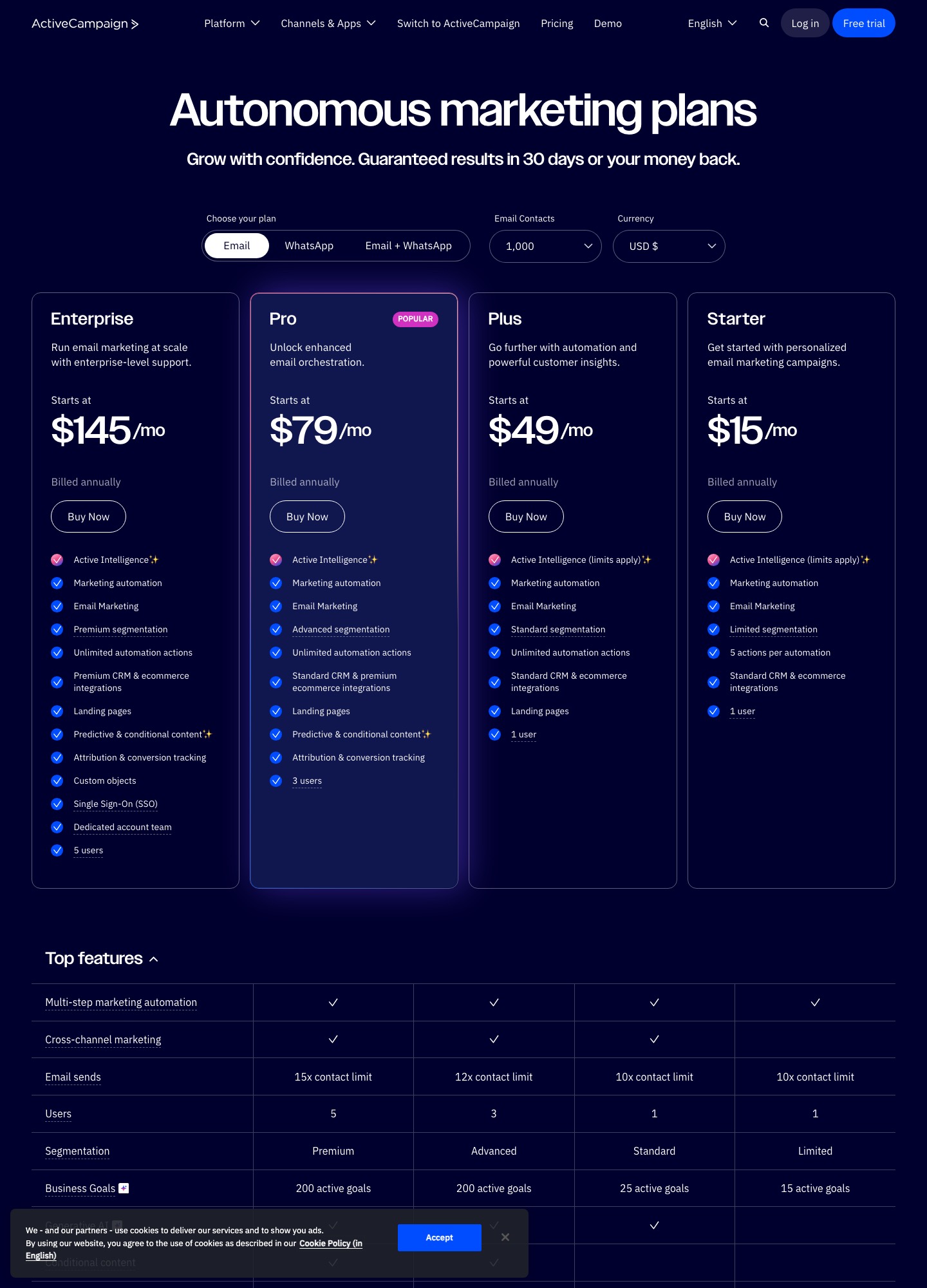
| Users included | 2; each extra user $39/mo | 1 on Starter and Plus, 3 on Pro, 5 on Enterprise |
| Limits on sequence size | No plan tiers; every listed feature sits in the one plan | Starter allows 5 actions per automation; Plus and above list unlimited actions |
| Quotes, invoices, payments, booking | Built in, including recurring payments and an appointment scheduler | Not among its listed plan features; connect a separate tool |
| Text messages | 500 texts and 100 voice minutes included; larger tiers from $24/mo (U.S. only) | SMS available as an add-on |
| Getting started | Implementation package required; price not listed on the page | Self-serve plans with a free trial |
| Contract | $299 early termination fee when cancelling an annual contract early | Plan prices are quoted as billed annually |
Figures are from the two pricing pages as read on 7 October 2026; Keap's panel quotes monthly billing and ActiveCampaign's plan cards quote annual billing, so compare the shape of the costs rather than treating the first row as like-for-like.
What each one does for email sequences
Keap: sequences as one part of the customer record
Keap's pricing page describes email that sends broadcasts and one-to-one messages and also "trigger[s] automated emails based on contact activity". The contact record carries tags for segmentation, lead scoring, and an automation history showing which automated steps each contact has received and where they sit in a sequence. Forms and checkout forms can start automations, and the billing side feeds back in: Keap lists past-due reminders and credit-card-expiration reminders as automations, so a failed payment can start a sequence without any outside tool. It also ships a library of ready-made automations, among them a new-lead nurture, a free-trial flow, cart abandonment and an online review request, and an AI assistant that drafts a campaign from a template.
Text is part of the same sequences: automated text messages, broadcasts and reply handling are listed, but the page marks them as U.S. only. Keap also lists an API with webhooks and a native Zapier integration, which is how an outside system such as your own app would start a sequence.
ActiveCampaign: automation depth is what you buy up
ActiveCampaign's four plans all include marketing automation and email, and the plan card is where the sequence limits live. Starter caps each automation at five actions, which fits a welcome email or a short follow-up but not a branching onboarding flow; Plus, Pro and Enterprise list unlimited automation actions. Segmentation deepens by plan (limited, standard, advanced, premium), and Pro and Enterprise add predictive and conditional content plus attribution and conversion tracking. Email sends are capped at a multiple of your contact limit: 10 times on Starter and Plus, 12 times on Pro and 15 times on Enterprise, so a 5,000-contact Plus account may send 50,000 emails a month across all its sequences and broadcasts.
The listed integrations include Shopify, WooCommerce, Salesforce, Microsoft Dynamics, Gmail, Outlook and Zapier. The CRM is described as standard on the lower plans and premium on Enterprise, and there is a landing-page builder from Plus upward. It does not list invoicing, payments or appointment scheduling, which is the main functional gap against Keap.
Neither is built around product events
If your sequences depend on what a user does inside a software product, such as a trial that branches on an activation event, both tools can receive events through an API or Zapier but neither is designed around them the way Customer.io, Userlist or Loops are. Our guide to trial conversion email sequences covers what that kind of flow needs, and ActiveCampaign alternatives lists the tools to look at if that is your situation.
Prices at 1,000, 5,000 and 10,000 contacts
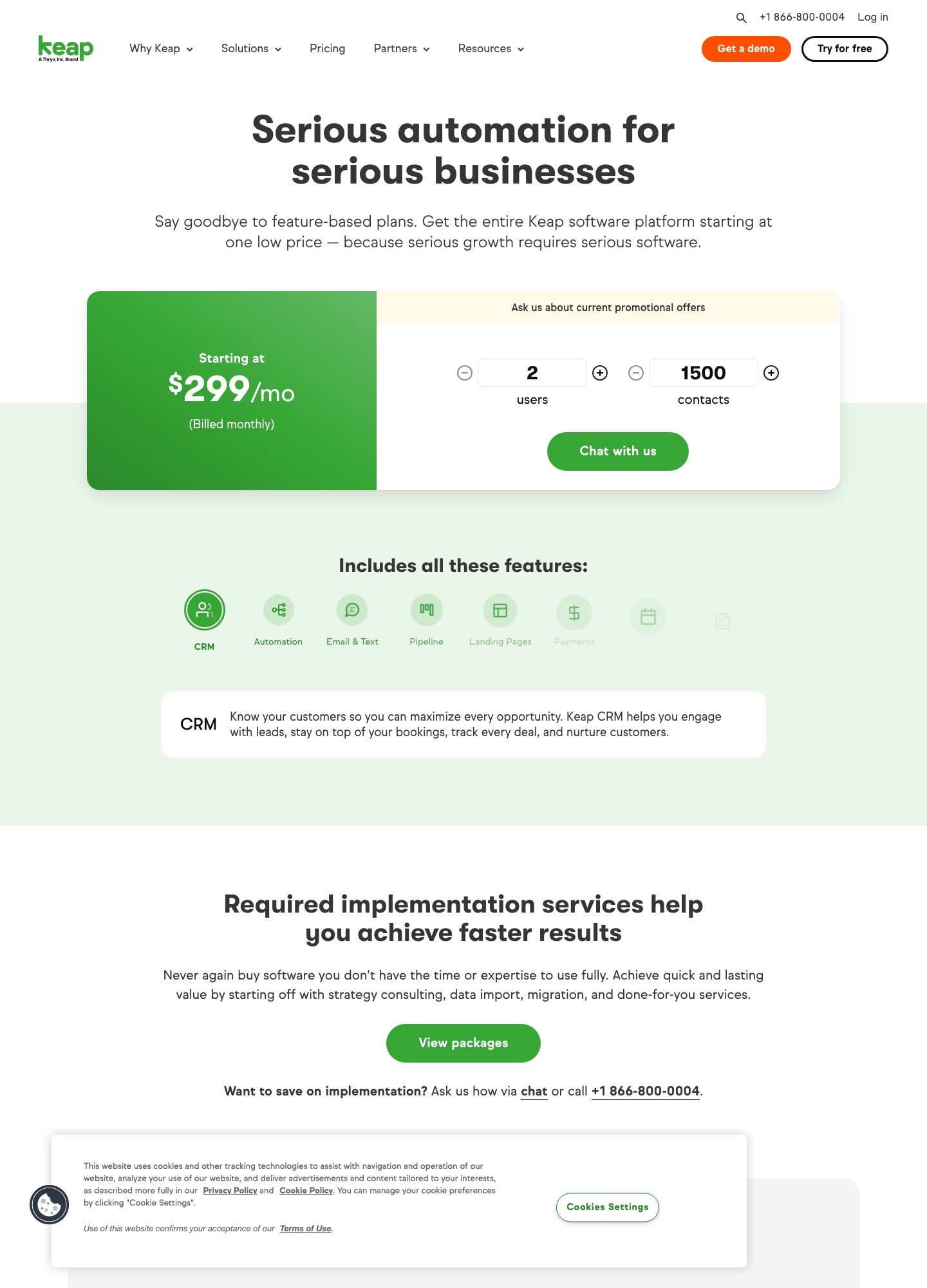
Keap's panel lets you set users and contacts and then shows a starting price, which is how the numbers below were read; the contact field starts at 1,500, so there is no 1,000-contact reading. ActiveCampaign's pricing page has a contact selector that reprices all four plans.
| Contacts | Keap (2 users, monthly) | ActiveCampaign Starter | ActiveCampaign Plus | ActiveCampaign Pro |
|---|---|---|---|---|
| 1,000 | $299 (at the 1,500 minimum) | $15 | $49 | $79 |
| 5,000 | $449 | $79 | $145 | $205 |
| 10,000 | $539 | $149 | $189 | $375 |
All figures are dollars per month. ActiveCampaign's come from its pricing page contact selector, billed annually; the 10,000-contact Starter figure matches ActiveCampaign's own cost article.
Working the bill for a three-person team
Take a service business with 5,000 contacts and three people who log in. Keap includes two users, so the third adds $39 a month on top of the panel's monthly figure. ActiveCampaign's Pro plan includes three users. If one person does all the mailing, Plus is enough. The yearly totals below multiply each monthly figure by 12 and leave out Keap's required implementation package, whose price the page does not list.
| Setup at 5,000 contacts | Monthly arithmetic | Per month | Per year |
|---|---|---|---|
| Keap, 3 users | 449 + 39 | $488 | $5,856 |
| ActiveCampaign Pro, 3 users | listed price | $205 | $2,460 |
| ActiveCampaign Plus, 1 user | listed price | $145 | $1,740 |
At 10,000 contacts the panel reads $539 with two users, while ActiveCampaign Plus is listed at $189 for one user, so Keap costs close to three times as much each month. That gap is not like-for-like: Keap's price also covers invoicing, payments, booking, a pipeline and a customer success manager, which would otherwise be separate subscriptions. Count those before deciding.
Two Keap terms affect the total beyond the monthly figure. The page states that annual contracts carry a $299 early termination fee if cancelled before the term ends, and that cancellation requests go by phone at least ten days before the next invoice date. Text-marketing tiers beyond the included 500 messages start at $24 per month. Keap also says to ask about current promotional offers, so ask before treating the starting price as final.
Which one to choose
Choose Keap if
- You sell services and want quotes, invoices, recurring payments and appointment booking to feed the same sequences, so that a paid invoice or a missed payment can start or stop a follow-up automatically.
- You want a managed start. The required implementation package covers a mapping session, done-for-you automations, data import and migration, and regular strategy calls, and the account includes a dedicated customer success manager.
- Two users cover your team, or you accept $39 per month for each additional one.
- Phone and text follow-up matter and you operate in the United States, where Keap's text marketing is available.
Choose ActiveCampaign if
- Email sequences are the main job: nurture, onboarding or ecommerce follow-up, with Shopify and WooCommerce on its integration list.
- Your list is several thousand contacts and the monthly price needs to stay well below a full suite. The 10,000-contact reading for ActiveCampaign Plus is $189, and the Keap panel reads $539 at the same size.
- You already invoice through Stripe or an accounting tool and do not want to move billing.
- You need the sequence limits to be a choice: Starter for a few simple automations, Plus for unlimited actions, Pro when several people build and you want conditional content and attribution.
Moving from Keap to ActiveCampaign
The move is mostly a rebuild of automations plus a data export, and the order of operations is shaped by Keap's contract terms.
- Check the contract date first. Keap's page says an annual contract cancelled before its one-year term ends carries a $299 early termination fee, and that cancellation is requested by phone at least ten days before the next invoice date. Plan the cutover for just before renewal.
- Decide what replaces the business functions. ActiveCampaign does not list invoicing, payments or appointment booking. Before you cancel Keap, line up a payment processor or invoicing tool (Keap itself connects to PayPal, Stripe and Eway for payments) and a booking tool, or the day after cutover you cannot bill.
- Export contacts and tags together. Keap segments by tags, so the tag list is your segment map. Recreate the tags you still use as ActiveCampaign tags or segments, and do not import contacts you no longer mail, because ActiveCampaign's price steps with the contact count you select.
- Import suppression first. Bring unsubscribes and bounced addresses in before the active list so a contact who opted out of Keap never receives an ActiveCampaign send.
- Rebuild sequences, do not expect them to transfer. Recreate the welcome or new-lead nurture first, using Keap's automation history to see where contacts currently sit, and drop contacts into the new automation at the matching step. On Starter, remember the five-action limit per automation; most Keap nurture flows need Plus.
- Move sending authentication. Keap requires DKIM authentication for senders, and ActiveCampaign will need its own records on your domain. Verify those before the first send, and leave Keap's records in place until Keap is cancelled.
- Replace text messaging separately. Keap's text marketing tiers and dedicated phone line have no listed counterpart on ActiveCampaign's plan cards, which show SMS as an add-on; check that add-on covers your country.
Weighing other ActiveCampaign matchups?
See how it stacks up against HubSpot and Brevo, or browse every comparison on the site.
HubSpot vs ActiveCampaign All comparisonsFrequently asked questions
Is Keap or ActiveCampaign cheaper for email sequences?
ActiveCampaign is cheaper at every list size on the two pricing pages: at 5,000 contacts Keap's panel reads $449 a month for two users while ActiveCampaign's Plus plan reads $145 for one user and Pro reads $205 for three. The baskets are different, though. Keap's price also covers invoicing, payments, booking and a customer success manager, and it comes with an implementation package whose price is not listed.
Does Keap publish its prices?
Keap publishes a "Starting at" figure that changes as you enter users and contacts on its pricing page: $299 a month for 2 users and 1,500 contacts at the time of reading, with the contact field starting at 1,500. It does not publish the price of the required implementation package, and it invites you to ask about promotional offers, so treat the panel as a starting point and get the full first-year cost in writing.
Can ActiveCampaign replace Keap's invoicing and payments?
Not on the evidence of its pricing page, which lists automation, email, landing pages, CRM and integrations but no invoicing, payment processing or appointment scheduler. Keap lists quotes, one-time and recurring invoices, checkout forms and a native payment processor. If those are central to how you work, keep a separate billing tool alongside ActiveCampaign or stay on Keap.
Which suits a SaaS free trial better?
Neither was designed around product events. Keap's automation library includes a free-trial template, and both Keap and ActiveCampaign can receive outside events through an API or Zapier. If your trial logic depends on in-app behavior, read the trial conversion sequence guide before deciding, and consider a tool built for events.