Resend Alternatives for Email Sequences
Leave Resend for sequences when your flows need more than it offers: automations start only from a custom event your code sends, and the documentation lists eight step types, none of which calls a webhook, sends an SMS or posts a push. The default move is Loops, which also starts flows when a contact property changes or a contact joins a list, adds A/B experiment nodes and keeps transactional sending in the same account, from $99 a month at about 10,000 subscribers. Pick Customer.io for event-heavy branching. Stay if your sequences are a few emails off one or two events: Resend's Marketing tab reads $80 at 10,000 contacts, cheaper than the three lifecycle tools below at that size.
This page is for someone who sends application email through Resend (receipts, invites, resets) and has started, or is about to start, running onboarding, trial or payment-recovery series from the same account. Prices and limits come from Resend's pricing page and its documentation, and from each alternative's own pages, all read on 7 October 2026. The editors read vendor pages and run no sends of their own, so every behaviour described is what the documentation says, not a measured result.
What Resend charges, in brief
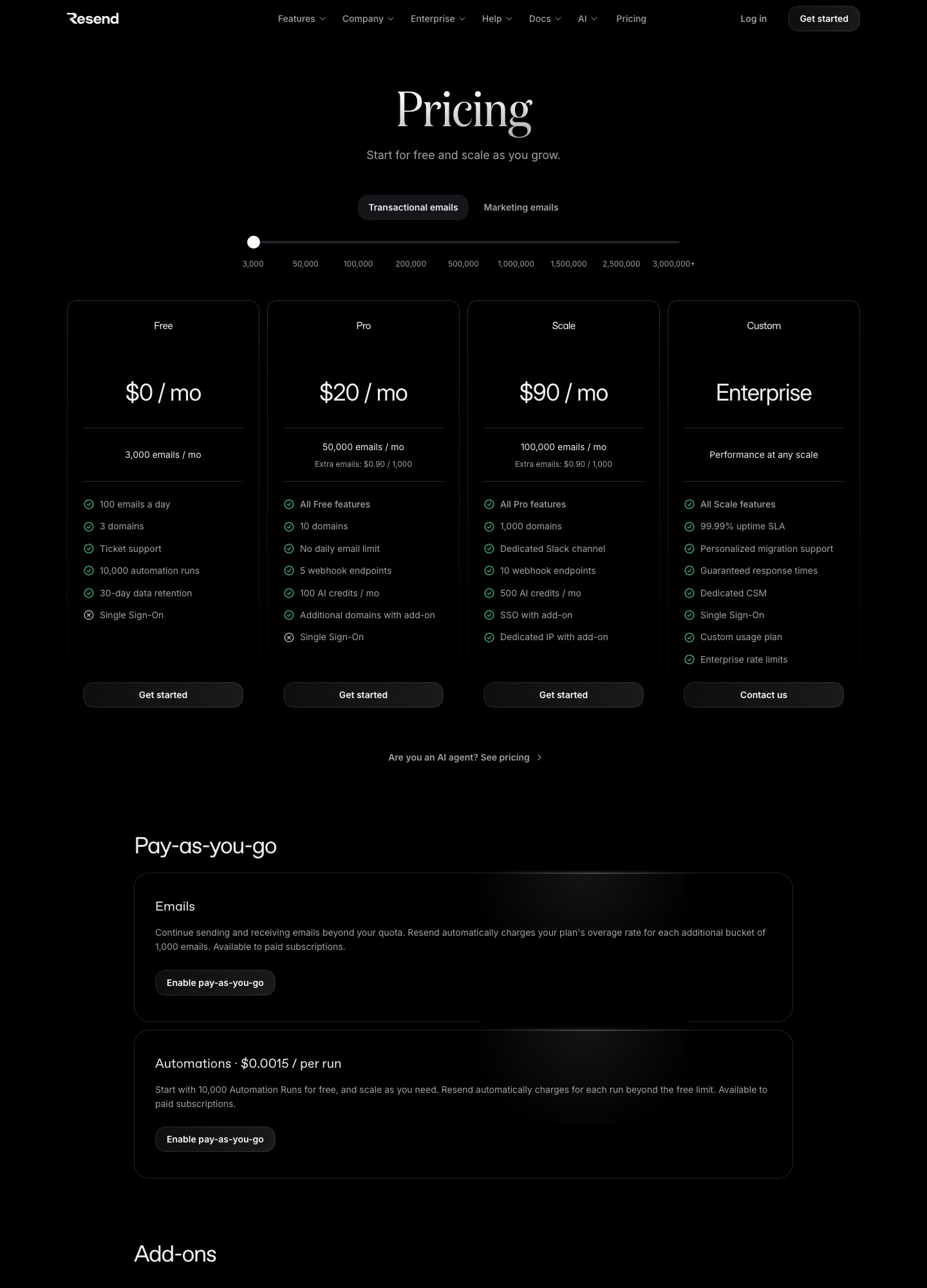
On the Transactional tab, Free is $0 for 3,000 emails a month with a 100-a-day cap and 3 domains, Pro is $20 for 50,000 emails with no daily cap, and Scale is $90 for 100,000; the slider reads Pro at $35 for 100,000 and Scale at $160 for 200,000. The separate Marketing tab prices by contacts, from free at 1,000 up to $450 at 100,000, and carries the automations this page is about. The full ladder of contact stops is in the cost section below, so this page does not repeat it here.
Five places Resend's sequence tooling runs out
1. Flows can only start from an event you send
Resend's trigger documentation says a trigger is the first step of every automation and its only setting is the name of an event. The event may carry a payload that later steps read through an event namespace, and the contact must be identified by an id or an email address; if the address is new, Resend creates the contact when the run starts. That is a clean fit for a developer who already emits events, and a poor fit for a marketer who wants a flow to begin when a plan field changes or a list is joined. Loops documents four trigger types for that case: contact added, contact updated, added to a mailing list, and event received.
2. Eight step types, with a 30-day ceiling on waiting
The steps reference lists trigger, condition, delay, wait for event, send email, add to segment, contact update and contact delete. A delay and a wait-for-event timeout each have a documented maximum of 30 days. A renewal reminder eleven months after signup therefore cannot sit in a single delay step, and nothing in the list lets a flow call your own API, send an SMS or push a notification. If your sequences are email-only and short, this is no constraint; if they run for a quarter or span channels, it is the first wall you hit.
3. Runs are metered once the free ones are gone
The pricing page states "Start with 10,000 Automation Runs for free, and scale as you need" and charges $0.0015 per run beyond the free limit, available to paid subscriptions that enable pay-as-you-go. Per the automations documentation, every trigger creates a run, so volume is counted in entries, not emails. A welcome flow entered 25,000 times is 25,000 − 10,000 = 15,000 billable runs, 15,000 × $0.0015 = $22.50. Small money, but it is a second meter beside the contact slider, and it grows with signups rather than with list size.
4. Unsubscribe handling is left to your template
The send-email step page says Resend does not add an unsubscribe link to emails sent from that step; you place {{{RESEND_UNSUBSCRIBE_URL}}} in the template yourself. Its unsubscribe-list page adds that a globally unsubscribed contact receives no broadcasts or automation emails, while API or SMTP transactional mail still goes out. So a nudge on day 3 of onboarding is yours to classify: if it is promotional, it needs the link; if it is not, it should not travel as an automation to someone who opted out. A tool that adds the link for you removes one way to get that wrong.
5. Account limits that bite as sequences grow
On the Transactional tab's Free plan the 100-a-day cap means a launch-day signup spike of a few hundred people will not all get a welcome email the same day. Pro lists 5 webhook endpoints and Scale 10, extra domains are an add-on at $20 a month for 100 more, a dedicated IP is $30 a month and only offered to Scale customers sending more than 3,000 emails a day, and single sign-on is a $150 a month add-on. The Free card lists 30-day data retention and the Pro and Scale cards build on it. None of these is a flaw for a small product; together they explain why teams outgrow one account that does receipts, resets and lifecycle mail all at once.
Where to go instead, ranked for sequence work
1. Loops: the default for a product team that wants marketers to own the flows
Best when your product already sends signup, activation and payment events and the people writing the emails are not the people deploying code. Gain: the workflows documentation lists six node types (trigger, email, timer, audience filter, branch and experiment), unlimited emails per workflow, and triggers that include property changes and mailing-list joins. Transactional email is included on paid plans at no additional charge, and there are no seat fees. Lose: you give up Resend's wait-for-event and contact-update steps, which are not among Loops' six nodes, and an active workflow cannot be edited without pausing it, during which new contacts queue for up to 24 hours. Price: free up to the 1,000 newest contacts and 4,000 sends in a rolling 30 days with a footer; Loops' pricing page reads $99 a month at 9,998 subscribers and $249 at 49,989. The head-to-head is in Loops vs Resend.
2. Customer.io: when sequences are the nervous system of the product
Best for teams whose messages depend on what people did or did not do. Gain: its trigger documentation lists attribute or segment, event, form submission, important date, object updated, relationship changes and webhook triggers, and its Wait Until block holds a person until a condition is met, with a maximum time so nobody waits forever. The pricing page lists transactional email as included on every plan, and US and EU data centers. Lose: money and tidiness. Essentials starts at $100 a month for 5,000 profiles, the comparison table marks managed deliverability as not included on that plan, and the billing documentation counts a profile that existed at any point in the month even if you delete it. Price: Customer.io's pricing page reads $100 at 5,000 profiles, $145 at 10,000 and $505 or more at 50,000.
3. Userlist: when the company, not the person, is the unit you message
Best for B2B SaaS where a trial belongs to an account with several users and the sequence should know that. Userlist's pricing page lists segments for users and companies, marketing and lifecycle email and in-app messages on Basic, with A/B split testing, conversion goals and advanced workflow features on Professional. Lose: it is the dearest option at small sizes, and its billing documentation sets a message allowance of 5× your tracked users with a 500,000 floor, then $1 per 1,000 additional messages. Price: Userlist's pricing page reads $149 a month for Basic and $349 for Professional at up to 10,000 users, each with an extra $10 or $12 per additional 1,000 users.
4. Brevo: when the leaving reason is a small budget and you want one vendor for everything
Best for a small team that wants automation, transactional sending and SMS under one login. Gain: Brevo's pricing-plans help article lists a free plan with 300 email sends a day, with marketing automation limited to 2,000 contacts on that plan, and a Standard plan that adds automation, A/B testing and advanced reports from $18 a month. Its help center also describes custom events that can start automated messages. Lose: pricing follows monthly email volume instead of contacts, the $9 Starter and $18 Standard figures are starting prices for the first tier of 5,000 emails a month, and removing the Brevo logo is a $9 a month add-on per the same article. Price: Brevo's pricing page has the volume slider.
5. Amazon SES: when the reason is the per-email bill and the sequences already live in your code
SES is a sending service, so what you gain is price and what you lose is every convenience. Amazon SES's pricing page lists Essentials at $0.16 per 1,000 emails and works an example of 250,000 emails at $40. Pro adds $105 per account per region per month and Enterprise $500, and a standard dedicated IP is $24.95 a month on the a la carte schedule. There is no flow builder to move to: whoever decides that email 3 goes out on day 7 is your scheduler, so this is the option for a team that has already built that and wants it cheaper.
6. Postmark: when you want transactional and bulk mail kept on separate streams
Postmark does not run sequences itself, so choose it for stricter separation of mail types and keep a lifecycle tool for the flows. The existing Resend vs Postmark comparison covers prices, streams and webhooks side by side. Price: Postmark's pricing page reads $15 a month for Basic at 10,000 emails.
7. SendGrid: only if you want sending and automation under one Twilio contract
Twilio's Automation guide says the feature needs the Advanced Marketing Campaigns package, offers Welcome and Custom automations, and advises keeping workflows to 10 messages. That last line is the reason it ranks last for long sequences. Price: the Marketing Campaigns pricing page reads Advanced from $60 a month, and the Email API pricing page reads Essentials at $19.95 a month for 50,000 emails.
What it costs at 5,000, 10,000 and 50,000 contacts
The table prices the audience that receives the sequences. Resend's contact stops are slider readings from the Marketing tab on 7 October 2026; the 10,000 and 50,000 stops come from the slider on that date without a separate screenshot, so check them on the page before you commit. Loops' slider does not stop at exactly 5,000, so the nearest reading is shown.
| Audience | Resend Marketing | Loops | Customer.io Essentials | Userlist Basic |
|---|---|---|---|---|
| 5,000 | $40 | $48 at 4,788 subscribers | $100 at 5,000 profiles | $149 (plan covers up to 10,000 users) |
| 10,000 | $80 | $99 at 9,998 subscribers | $145 | $149 |
| 50,000 | $250 | $249 at 49,989 subscribers | $505 or more | No reading at 50,000; $369 at 32,000 users |
Userlist's page shows readings of $229 at 18,000 users and $369 at 32,000 but none at 50,000, so that cell names the nearest one rather than extending its per-1,000 rate. Brevo is left out because it prices by email volume. At 50,000 the field flattens: Resend's $250 and Loops' $249 are a dollar apart, so past that size the choice is the builder, not the bill. Customer.io's page shows 50,000 as "$505+" and suggests Premium for a similar price, so treat that cell as a floor.
If the reason you are leaving is the sending bill rather than the sequences, price the volume of emails instead. Assumptions: monthly emails, list prices on each page, no extras.
| Emails a month | Resend | Amazon SES Essentials | SendGrid Email API |
|---|---|---|---|
| 50,000 | Pro $20 | 50 × $0.16 = $8.00 | Essentials $19.95 |
| 100,000 | Pro $35 (Scale $90) | 100 × $0.16 = $16.00 | Essentials $34.95 (Pro $89.95) |
| 500,000 | Scale $350 | 500 × $0.16 = $80.00 | No 500,000 stop; Pro is $249 at 300,000 and $499 at 700,000 |
The SES column multiplies thousands of emails by the page's $0.16 rate and leaves out attachment data at $0.12 per GB and any add-ons. The gap is real, and it is also the price of owning the scheduler, the suppression handling and the dashboards yourself.
Leaving Resend: what to export, what to rebuild
Contacts first. Resend's contacts page says admins can download contacts, broadcasts, segments, emails, domains, logs and API keys as CSV: apply your filters, press Export, and files of 1,000 rows or fewer download at once while larger ones arrive by emailed link that stays available to admins for 7 days. Past exports are listed under Settings, Team, Exports. To get the unsubscribed contacts as their own file, filter the contact view to the Unsubscribed status before exporting; the unsubscribe-list page uses that same filter for bulk deletion. Resend's suppressions page says the suppression list can also be exported as CSV, with each entry marked bounce, complaint or manual.
What does not come with you: the automations. The export list on the contacts page does not include them, so plan to rebuild each flow by hand, reading the steps from the dashboard or the API's Retrieve Automation endpoint. Also left behind in Resend: webhook endpoints, domain DNS records and 30-day logs. If your templates are React Email files in your repository, they travel for free; templates built only in the dashboard need their HTML copied out before you cancel.
Consent and suppression traps specific to Resend
- Topics are separate from the global flag. Resend treats topic opt-outs as per-subject preferences, so a contact who dropped one topic can look subscribed in a flat file. Check whether your export carries topic status before you assume the list is clean.
- The import can re-start flows. In Loops, a CSV upload does not fire the Contact added trigger unless you opt in, and a Trigger workflows toggle exists for re-running flows on existing contacts. Leave it off for the migration file, or everyone receives your welcome series again.
- Unsubscribed means different things on import. Loops marks everyone in a CSV as subscribed unless a
Subscribedcolumn says false (see its CSV upload page), and will not re-subscribe a contact already marked unsubscribed. Customer.io reserves anunsubscribedattribute for the same purpose and treats topic preferences as a separate import, as its CSV import page explains. - Move bounces and complaints before the first send. If the destination is Amazon SES, its suppression list documentation describes a bulk import job of up to 100,000 addresses per S3 object, with lines such as an address followed by BOUNCE, and requires an account out of the sandbox. Loops' suppression page does not say whether suppressions can be imported, so ask before assuming.
An overlap plan with concrete days
- Days 1 and 2: export contacts (subscribed and unsubscribed as separate files), the suppression list, and the HTML of any dashboard-only templates. Write down every event name your code sends and which automation each starts.
- Day 3: add the new tool's sending subdomain and DNS records. Do not touch Resend's records.
- Days 4 to 7: import with unsubscribed flags and suppressions, with any import-triggered flows switched off. Rebuild the single flow that fires most often and send it to seed addresses you own.
- Day 10: point the event call in your code at the new tool, for new signups only. Leave the Resend automations enabled so people already inside them finish, but send them no new events.
- Day 10 plus your longest wait: because each Resend delay can run up to 30 days, a run started on day 9 may still be waiting well into the following month. When the last in-flight run has finished, export the logs you need, stop the automations and cancel the Marketing plan.
Pilot one sequence before moving all of them. A vendor-neutral version of these steps is in the email sequence tools migration guide.
When to stay on Resend
Stay if a typical flow is a welcome email, a day-3 tip and a day-7 nudge, started by one event your code already sends, to a list under 10,000. Resend's Marketing tab reads $0 at 1,000 contacts and $80 at 10,000, the 10,000 free automation runs cover the first 10,000 entries, and you keep one vendor and one set of DNS records for receipts and lifecycle mail. A worked case: a product that gains 3,000 signups a month starts 3,000 runs, under the 10,000 free runs the pricing page lists, so on the page's own numbers the automations add nothing to the bill. Moving that team to a $99 tool would buy features it has no flow for yet. For a wider view of where it sits, see tools for transactional email and tools for developers, the tool directory and the alternatives hub.
Frequently asked questions
Can Resend automations handle onboarding and failed-payment emails?
Yes, as long as your own code starts them. Resend's automations documentation says a flow begins with a trigger event that your application sends, optionally with a payload that later steps read as event data, so a failed-payment webhook from your billing system can be forwarded as an event that starts a short series. What Resend does not do is watch the card or retry the charge; that stays with your payment provider. If you also want the flow to react to a profile attribute changing, you have to emit an event for that change yourself.
Do I pay for sending and for contacts separately?
The pricing page presents them as two tabs: a Transactional tab priced by emails a month and a Marketing tab priced by contacts. It is not clear from the page how the two combine on one invoice, so ask Resend or check the billing screen before you plan on a single number. Also note that an event sent for an email address that is not yet a contact creates one when the run starts, which may move you up the contact slider.
What does an automation cost once the free runs are used up?
Resend's pricing page lists automations at $0.0015 per run, with the first 10,000 runs free and the charge applying to paid subscriptions that enable pay-as-you-go. Each trigger creates one run, so a signup flow started 25,000 times costs 15,000 × $0.0015 = $22.50 beyond the free allowance. Runs, not emails, are what is metered, which means a long sequence costs the same as a short one.
Can I move only the sequences and keep Resend for receipts and password resets?
Yes, and it is the lowest-risk way to try an alternative. Use a separate sending subdomain at the new tool so its reputation does not mix with your resets. Both Resend and Loops document that API transactional mail still reaches contacts who unsubscribed from marketing, so the split also keeps your critical mail out of the unsubscribe logic of the new tool.
Which alternative is cheapest at 10,000 contacts?
None of them is cheaper than Resend's own Marketing tab, which reads $80 at 10,000 contacts on its slider. Loops reads $99 at 9,998 subscribers, Customer.io Essentials $145 at 10,000 profiles and Userlist Basic $149 for up to 10,000 users. You switch to these for what the builder can do, not to save money at that size.