Omnisend Alternatives for Email Sequences
Omnisend alternatives for email sequences: where its plans run out, seven ranked exits, a 90,000-send worked case, export steps and a day-by-day cutover.
Leave Omnisend when you keep hitting the edges between its plans. Standard sends up to 12 times your list size, and unlimited sending, SMS credits and advanced reporting all sit on Pro. Its pricing page also leads with promotional first-three-month rates, so the figure that matters is the one you pay from month four. For a store whose flows have outgrown Standard, the default is Drip, which bundles unlimited sends into one price per list size. Stay if you are on the free plan, or if email and SMS in one set of flows is the reason you chose Omnisend.
Prices were read from the vendors' own pages on 7 October 2026 and are US dollars. Omnisend's slider only showed its smallest list-size selector when read, so this page puts the other vendors' numbers next to your own Omnisend invoice rather than guessing at the middle of its ladder.
Omnisend's pricing page as captured
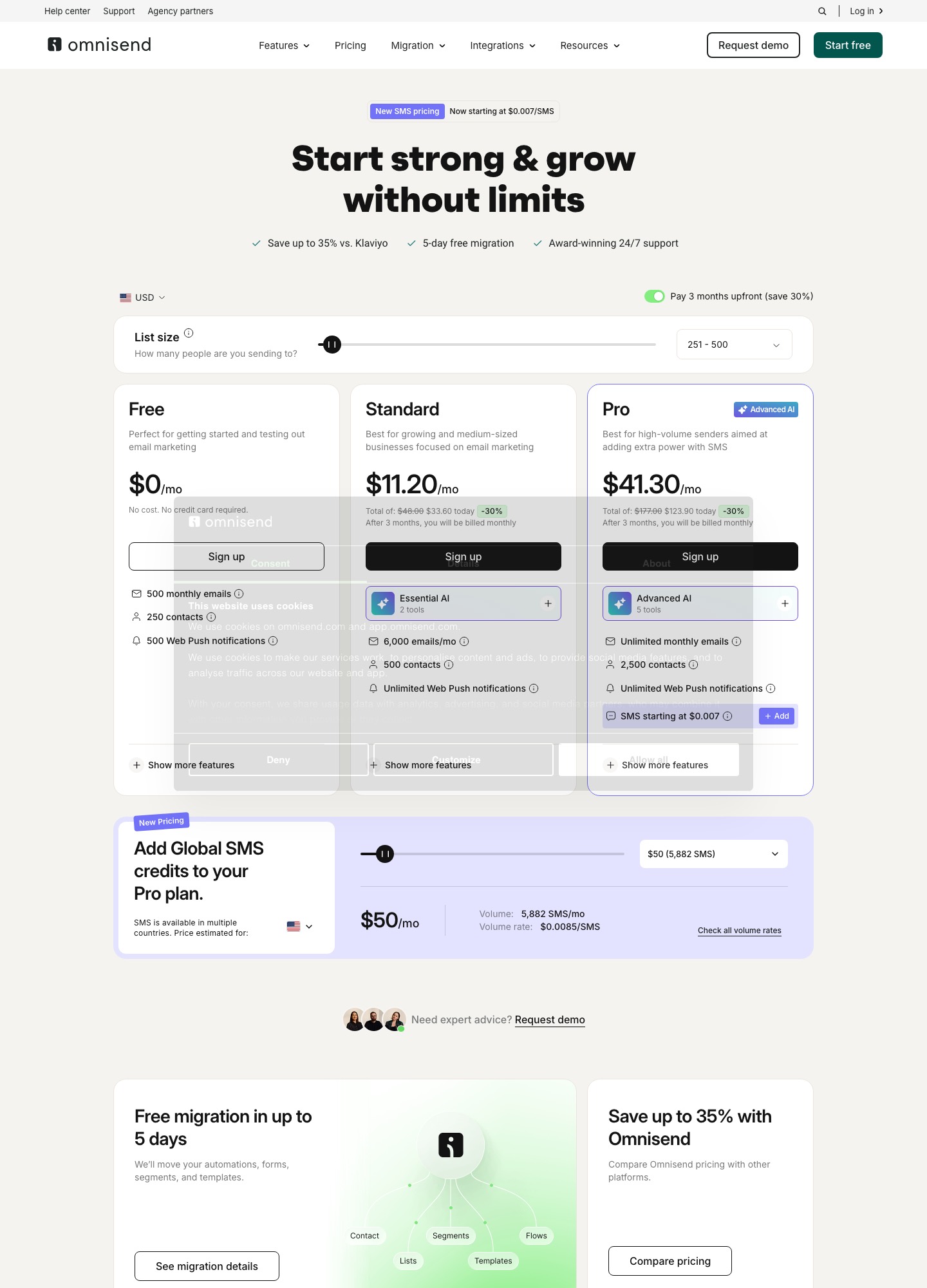
Omnisend's pricing page has three cards. Free is $0 for 250 contacts, 500 emails and 500 web push notifications a month. Standard shows 500 contacts and 6,000 emails a month; Pro shows 2,500 contacts and unlimited emails, with SMS credits sold on top. The page says it is billing in USD, offers a "Pay 3 months upfront (save 30%)" switch, and routes lists above 150,000 active profiles to a sales conversation. The full price-by-list-size detail belongs on a pricing page; this page covers what happens when the plan structure itself stops fitting.
Where Omnisend's plans run out
The send ceiling changes with the plan
The feature grid reads 500 emails a month on Free, 12 times the list on Standard, and unlimited on Pro with a fair-use limit of 60 times the list. At the 500-contact selector, 12 x 500 = 6,000, which matches the Standard card. The FAQ adds that on Free or Standard you are offered an upgrade when you pass the limit and asked to confirm before it happens, so a busy December does not silently reprice you. It does mean the plan above Standard is the only way to keep sending.
The step to Pro buys several things at once
Omnisend's FAQ lists the reasons to choose Pro over Standard: unlimited emails, SMS at volume rates starting at $0.007, priority support from a dedicated account expert, and advanced reporting. The account expert is free only to accounts paying at least $400 a month, so it is not something you can buy on its own. SMS is its own meter on top of the plan: the volume table reads $0.009 for US spend from $10 to $49.99, $0.0085 from $50, $0.008 from $1,000 and $0.007 from $10,000. At the $0.0085 rate, $50 of spend works out to 50 / 0.0085 = 5,882 messages.
Non-subscribers count
The page says it bills "subscribers and non-subscribers who received automated messages" and that unsubscribed contacts are not billed. In a store that includes guests who checked out without opting in and then got an order or cart reminder. Omnisend repeats the point on its Klaviyo migration page, warning that a large imported non-subscribed list can push an account into a higher tier.
The headline prices are promotions
With the upfront switch on, the Standard card reads $11.20 a month and shows "Total of $48.00" struck through against $33.60 today. The Pro card reads $41.30 with $177.00 struck through against $123.90 today. Check the arithmetic and the promotion is a clean 30 percent: 33.60 / 3 = 11.20, and 48.00 x 0.70 = 33.60. Both cards add "After 3 months, you will be billed monthly" without printing that monthly number in the text read. If you are deciding whether to leave, the number to find is the post-promotion monthly figure for your exact list size.
Free-plan and billing details worth knowing
The grid marks the "Powered by Omnisend" badge on emails and forms as required on Free and optional on paid plans. The FAQ lists Visa, Mastercard and American Express as accepted and says Discover, Diners Club, JCB and UnionPay are not supported, which matters for some buyers. The same FAQ says the Free plan can use all paid features within its 500-email, 250-contact limits, yet the grid shows 500 web push notifications on Free against unlimited on paid plans, so read the grid before relying on any single feature.
Reasons to stay put
A shop with 2,000 contacts that sends 20,000 emails a month is using 20,000 / (12 x 2,000) = 83 percent of Standard's room, which is comfortable. If that shop also runs SMS inside the same workflows, leaving means splitting two channels across two tools and carrying SMS consent records over, which is a bigger project than the email move. Staying also makes sense if you already spend the $400 a month that brings an account expert, or if what Standard reports is enough for you. In those cases the better use of a morning is to ask Omnisend for the exact post-promotion monthly figure and decide from that.
Seven exits, ranked for a store that has outgrown Omnisend's plans
The order assumes the usual trigger, a store running into the Standard ceiling or the Pro step. Switch the order if your trigger is different: someone who wants a sales pipeline attached to their email should read entry five first.
1. Drip: one price, unlimited sends
Price: Drip's pricing page reads $39 a month up to 2,500 people, $89 at 5,000 people and $154 at 10,000 people.
The bundle lists unlimited email sends, dynamic segments, onsite campaigns and up to 50 workflows. Its automation page counts more than 20 ecommerce templates, including abandoned browse, post-purchase and win-back, which covers the same ground as Omnisend's pre-built flows. For a store that mails 18 times per person each month, the bundle removes the ceiling question. What you give up is the free plan (Drip offers a 14-day trial, and unlimited emails are not available during it), and SMS is not in the slider price: Drip's billing article says to ask support to enable it. Drip's billing also follows the previous month's peak count of active people, not today's.
2. Klaviyo: more depth, higher floor
Price: Klaviyo's pricing page reads $30 at 1,000 profiles, $100 at 5,000 and $150 at 10,000, with 10 times the profile count in emails.
This is the move when the constraint is capability instead of cost. Omnisend itself advertises savings against Klaviyo, so you should not expect a cheaper bill. The send ceiling is 10 times the profiles, below Omnisend Standard's 12. Its free plan has the same limits as Omnisend's, 250 profiles and 500 sends a month. Klaviyo's migration article describes a CSV import with a consent column and a separate suppression upload. See Klaviyo alternatives if you want the reverse view.
3. MailerLite: unlimited sending at a low list price
Price: MailerLite's pricing page reads Power at $39 for 1,000 subscribers, $69 at 5,000 and $129 at 10,000, and Comfort at $19, $49 and $89.
Power lists unlimited monthly emails and unlimited automations, and it adds 24/7 live chat. Comfort allows 50 active automations of up to 100 steps and sends 10 times the tier ceiling. That makes Power the plan to price against Omnisend Pro for send volume. The free plan is 250 subscribers, 2,500 emails and 3 active automations of 5 steps. Shopify and WooCommerce are among its listed integrations, and the grid has ecommerce rows whose per-plan marks did not survive the text capture, so test the exact triggers you use before committing.
4. Brevo: pay for volume, not people
Price: Brevo's pricing page starts Starter at $9 and Standard at $18 a month for 5,000 emails a month, billed monthly.
Because the price follows the email volume you pick, a large list mailed gently costs little. Standard lists unlimited multi-step workflows and web and event tracking. The page lists advanced ecommerce features, meaning AI recommendations, back-in-stock alerts and coupons, in the Professional card from $499 a month, so a store that depends on them is back at a high price. Brevo suits sequences made of welcome and win-back emails.
5. ActiveCampaign: sequences that end with a person
Price: ActiveCampaign's pricing page reads Starter at $15 for 1,000 contacts, $79 at 5,000 and $149 at 10,000, and Plus at $49, $145 and $189, billed annually.
Choose it when a flow should hand a customer to a salesperson, for wholesale or high-ticket orders. Starter limits each automation to 5 actions, and send room is 10 times the contact limit on both entry plans, below Omnisend Standard's 12. Pipelines and lead scoring are sold as add-ons whose prices the page does not publish.
6. Mailchimp: the same send ratio, different bands
Price: Mailchimp's pricing page lists Standard at $100 for 2,501 to 5,000 contacts and $135 for 5,001 to 10,000.
Standard sends 12 times the contacts, the same ratio as Omnisend Standard, so it does not relieve a sending ceiling. Its free plan is 250 contacts and 500 sends a month, with 250 a day. It earns sixth place for stores that mainly need a familiar editor. Mailchimp's own page shows 50 percent first-year offers on some bands, which makes the first invoice look lower than the list figure.
7. Sendlane: a send-volume plan with a $100 floor
Price: Sendlane's pricing page starts at $100 a month for 50,000 emails, with unlimited profiles and CPM overage at $2.00.
It is built for the shop with a big list and modest sends, which is not the Omnisend Standard buyer. Its SMS packages start at 0.9 cents per credit, which Sendlane says includes carrier fees, the same figure as Omnisend's first volume tier. The trial is 60 days but limited to 100 contacts and 500 sends.
Price check at 1,000, 5,000 and 10,000 contacts
Rows are list sizes and columns are tools, in dollars a month. ActiveCampaign is billed annually, MailerLite and Brevo monthly, Mailchimp at list price. Omnisend appears only where its page shows a number.
| Contacts | Drip | Klaviyo | MailerLite Comfort / Power | ActiveCampaign Starter / Plus | Mailchimp Standard |
|---|---|---|---|---|---|
| 1,000 | $39 (band for up to 2,500) | $30 | $19 / $39 | $15 / $49 | Not read |
| 5,000 | $89 | $100 | $49 / $69 | $79 / $145 | $100 |
| 10,000 | $154 | $150 | $89 / $129 | $149 / $189 | $135 |
For reference, Omnisend's page showed Free at $0 up to 250 contacts, Standard at a promotional $11.20 for 500 contacts and Pro at a promotional $41.30 with 2,500 contacts. Brevo's Starter from $9 and Standard from $18 follow email volume instead of contacts, and Sendlane's $100 is for 50,000 emails with unlimited profiles. Neither fits a row.
A 90,000-send month on a 5,000-contact list
Suppose a store mails each of 5,000 contacts 18 times a month across campaigns and flows: 5,000 x 18 = 90,000 emails. The ceilings on the cheaper plans are:
- Omnisend Standard: 12 x 5,000 = 60,000. Short by 30,000, so Pro would be needed.
- Mailchimp Standard: 12 x 5,000 = 60,000. Short by the same 30,000.
- Klaviyo Email and MailerLite Comfort: 10 x 5,000 = 50,000. Short by 40,000.
- Drip at $89 and MailerLite Power at $69: unlimited sends at that stop, so the volume fits. Power is 89 - 69 = 20 a month cheaper, and 20 x 12 = 240 a year.
At lower sending the order flips: a list mailed four times a month stays under every ceiling above, and the cheapest plan wins.
Getting out of Omnisend: exports, consent and a two-week schedule
Omnisend's export article says only Owner, Admin and Analyst roles can export. Go to Audience, then Exports, choose New Export, pick everyone, an email subscription status, a segment or a tag, and download from the Exports tab. Lists under 10,000 usually finish in under a minute, and 100,000 or more can take several minutes. The CSV carries dates added, email and SMS opt-in and opt-out dates, subscription status and consent for each channel, push status, name and address fields, total spent, tags and segments in comma-separated columns, and custom properties across several columns. Scheduled exports are not supported.
Two further files protect you. The unsubscribed-contacts article explains how to build a segment on Subscription Status is Unsubscribed, per channel, and export it with opt-out dates and reasons. Reasons include bounced and reported as spam, so the file doubles as your suppression list. Use "is Unsubscribed" and avoid "is not" with any status, which the article says returns two groups at once. Omnisend also recommends keeping unsubscribed contacts rather than deleting them, because deletion removes message and purchase history.
What stays behind: the export article describes contacts only, so workflows, forms and templates have no export in the pages read and must be rebuilt. Order and product history lives in your store platform, and the new tool will rely on its own store connection. Omnisend's contact statuses are per channel, which means an email subscriber can be an SMS non-subscriber; carry the consent columns across rather than flattening them into one yes or no. If you took the three-months-upfront offer, find out the end date before you fix a cutover.
| Day | Do this | Because |
|---|---|---|
| 1 | Export subscribed, unsubscribed (with reasons), and one file per tag or segment you use. List every live workflow with its trigger, delays and filters. | Workflows cannot be exported, so your notes are the only copy. |
| 2 to 3 | At the destination, import unsubscribed people first, then the subscribed file. Drip's import guide asks for two separate imports for this reason. | Opt-outs from one platform are not marked automatically in another. |
| 4 to 5 | Connect the store and set up SPF and DKIM for the sending domain. Send nothing to the full list yet. | A freshly authenticated domain starts with no sending history. |
| 6 to 10 | Rebuild flows in this order: abandoned cart, post-purchase, welcome, browse, win-back. Leave Omnisend's versions live. | Order and cart triggers show quickly whether the store connection works. |
| 11 to 13 | Move one flow per day: turn the new one on and the Omnisend one off in the same hour. | Customers never get both. |
| 14 | Export unsubscribes again, import them, then run a final suppression check on a handful of test addresses. | It catches opt-outs made during the overlap. |
| 30 | Cancel Omnisend once the reports you need are saved. | Keeps a month of fallback. |
The destination's own services help only partly. Drip's migration page covers lists above 17,500 people, and for any other list the import is yours. The migration guide covers consent evidence in more depth, and the alternatives directory links the other incumbents. If your sequences are not store-driven at all, Customer.io against Drip is the comparison to read.
Frequently asked questions
Does Omnisend charge for unsubscribed contacts?
Its pricing page says it bills subscribers and non-subscribers who received automated messages, and that unsubscribed contacts are not billed. The risk for a store is the non-subscriber group: a customer who bought without opting in and then received an order or cart email still counts. Segment that group before you compare any other tool's price per contact.
Is $11.20 what Omnisend Standard costs each month?
Not on the evidence of the page. The $11.20 and the $41.30 shown for Pro are first-three-month rates under the pay-three-months-upfront offer, with $33.60 and $123.90 charged on the day. The cards add that after three months you are billed monthly, but the text does not state that later figure, so read it off the live page after choosing your list size.
Can I export my Omnisend automations?
The export article describes a contact file only: names, emails, phone numbers, subscription status per channel, opt-in and opt-out dates, tags, segments, total spent and custom properties. It names no workflow export, so plan to rebuild each flow by hand in the new tool, starting from its own templates. Keep the Omnisend versions switched on until each replacement has sent.
What does Omnisend's SMS cost, and does it move with me?
SMS credits are an add-on to the Pro plan, and the page's volume table for US sends reads $0.009 per message from $10 to $49.99 of spend, $0.0085 from $50, $0.008 from $1,000 and $0.007 from $10,000. Your opt-in records do not move on their own: export the SMS opt-in dates and consent column, and check whether the new tool needs support to switch SMS on. Drip, for one, asks you to contact its support team to enable it.
Is there a free plan I can drop to?
Several vendors list one, with different ceilings. Klaviyo and Mailchimp both allow 250 contacts and 500 sends a month, MailerLite allows 250 subscribers and 2,500 emails with 3 active automations, and Brevo allows 300 emails a day. Omnisend's own free plan is 250 contacts and 500 emails, so a free move only helps if you are far below those limits.