Mailgun Alternatives for Email Sequences
Mailgun's pricing page lists sending, validation, inbound routing and mailing lists but no automation, and its documentation caps scheduled delivery at 3 or 7 days depending on plan, so anyone running onboarding or dunning series on it is running their own scheduler. Leave for a tool with a builder. The default is Resend: its automations accept delays of up to 30 days per step, and its Pro plan lists 50,000 emails for $20 against Mailgun's $35 Foundation. Lifecycle-heavy teams should look at Loops or Customer.io. Stay if you depend on Mailgun's inbound routing, its US and EU regions or Scale's SAML SSO, and your series already live in code.
The reader here pushes application email through Mailgun's API or SMTP relay and wants sequences (welcome, trial, receipts, failed-payment reminders) without writing a job runner for each. Numbers come from Mailgun's pricing page, its developer documentation and each alternative's own pages, read on 7 October 2026. The editors read vendor pages and send nothing themselves, so everything below is as documented.
Mailgun Send at a glance
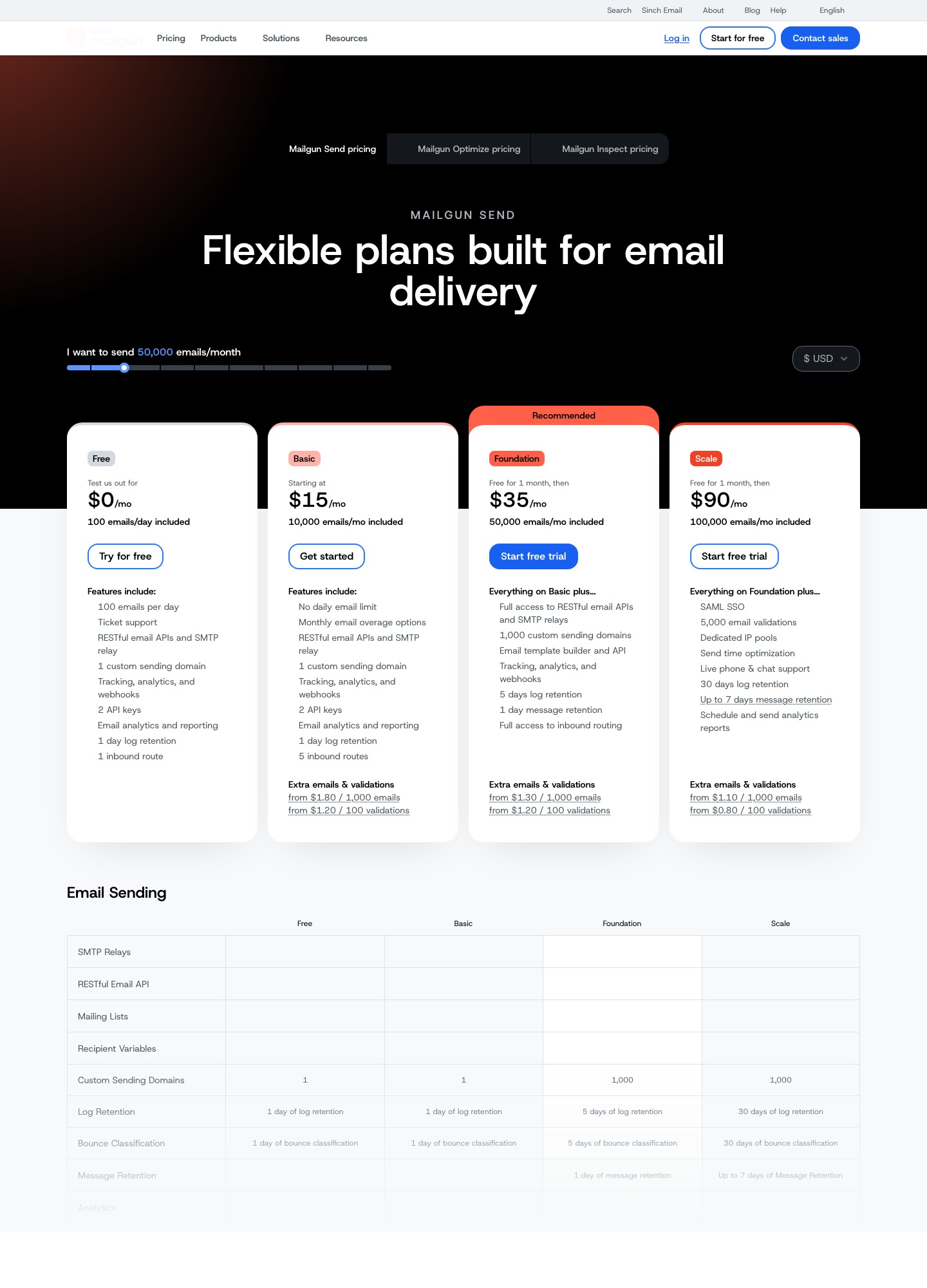
Mailgun Send reads Free at $0 for 100 emails a day, Basic from $15 for 10,000 emails a month, Foundation at $35 for 50,000 and Scale at $90 for 100,000, the last two free for the first month. Its slider shows Foundation at $75 for 100,000 emails, Scale at $215 for 250,000 and $400 for 500,000. The page also has tabs for Optimize and Inspect, which are separate deliverability and pre-send testing products, and its top bar links to Sinch Email.
Five reasons sequence senders outgrow Mailgun
Scheduling ends at a week or less. Mailgun's scheduling guide says a message can be delivered later through the
o:deliverytimeparameter, up to 3 days ahead, or up to 7 if your plan has 7 or more days of storage. Day 10 of a trial series cannot be queued on day 1, so your application has to wake up, check the user's state and send. The API reference does include a page for deleting scheduled and undelivered mail, which helps a dunning flow cancel its reminders once a card is fixed, but the logic is still yours.Mailing lists fan out; they do not run journeys. The mailing-lists page describes one alias that sends a copy to every subscribed member, with per-member variables and a generated unsubscribe link. It describes no triggers, delays or branching, and the pricing page shows no automation row.
The history you can see depends on the tier. The Free and Basic cards list 1 day of log retention, Foundation 5 days and Scale 30 days, with message retention of 1 day on Foundation and up to 7 days on Scale. A support question about a nudge that went out last Tuesday is answerable on Scale, and hard to answer from one day of logs on Basic.
The next plan up buys things, not just volume. At 100,000 emails, Foundation reads $75 and Scale $90. The extra $15 buys SAML SSO, 5,000 included validations, dedicated IP pools, send time optimization, live phone and chat support and the 30-day logs. One dedicated IP is included with Foundation at 100,000 and Scale; further IPs are $59 per IP per month. Overage on extra emails runs from $1.80 per 1,000 on Basic to $1.30 on Foundation and $1.10 on Scale.
Neighbouring products are priced on their own meters. Optimize, Inspect and validation are separate lines; the page shows validations from $1.20 per 100 on Basic and Foundation and from $0.80 on Scale. A signup-driven sequence that validates every new address pays on that meter as well as the email one: 10,000 sign-ups is at least 100 × $1.20 = $120 at the Basic and Foundation rate.
Alternatives, ranked for people running sequences on Mailgun
| Rank | Alternative | Choose it when | Price line |
|---|---|---|---|
| 1 | Resend | You want a builder and a sender in one account, with longer delays than Mailgun can schedule | Pro $20 at 50,000 emails; Marketing $40 at 5,000 contacts |
| 2 | Loops | Marketers should own flows triggered by product events | $99 at 9,998 subscribers |
| 3 | Customer.io | Branching, waits and EU data centers matter | $100 at 5,000 profiles |
| 4 | SendGrid | You want a like-for-like sender with an automation product attached | Essentials $19.95 at 50,000 emails |
| 5 | SparkPost | The bill at 250,000 to 500,000 emails is the pain | Growth $175 at 250K |
| 6 | Amazon SES | Volume is high and the scheduler is already yours | $0.16 per 1,000 emails |
| 7 | SMTP2GO | You send little and want a larger free plan | Starter $10 at 10,000 emails |
1. Resend. The case rests on the exact limits above. Resend's steps reference gives delay and wait-for-event steps a maximum of 30 days each, against Mailgun's 3 or 7 days for a scheduled message, and its pricing page lists 30-day data retention on the Free card against 1 day on Mailgun's Free and Basic. Pro is $20 for 50,000 emails and $35 for 100,000 on Resend's pricing page; Foundation is $35 and $75 at those volumes. Lose: Mailgun's inbound routes (Free lists 1, Basic 5, Foundation full access) have to be mapped by hand to Resend's receiving feature, the Resend pages read here state no hosting region, and automations start only from an event your code sends. List what arrives through your routes before you cancel anything.
2. Loops. Its workflows start from contact-added, contact-updated, mailing-list and event triggers, with timers, audience filters, branches and experiments in between, and its transactional API sends to any address whether or not it is in your audience, so receipts need not become contacts. Lose: the transactional send carries no unsubscribe link and no open or click tracking, and an active workflow must be paused before its emails can be edited. Free covers the 1,000 newest contacts and 4,000 sends in 30 days; Loops' pricing page reads $99 at 9,998 subscribers and $249 at 49,989. See also Loops vs Resend.
3. Customer.io. The trigger documentation lists event, attribute or segment, form, date and webhook triggers, and a Wait Until block can hold someone until a condition is met or a maximum time passes. Its pricing page lists US and EU data centers, which matters if you chose Mailgun for its EU option. Lose: price and a profile meter; Customer.io's pricing page reads $100 at 5,000 profiles, $145 at 10,000 and $235 at 20,000, and a profile that existed at any point in the month still counts after deletion, per its billing documentation.
4. SendGrid. The closest like-for-like swap: SendGrid's Email API pricing reads Essentials at $19.95 for 50,000 emails and $34.95 for 100,000, where Foundation is $35 and $75. For sequences, Twilio's Automation guide says you need the Advanced Marketing Campaigns package (from $60 a month on the Marketing Campaigns pricing page) and advises keeping workflows to 10 messages. The head-to-head is in SendGrid vs Mailgun.
5. SparkPost. SparkPost's pricing page reads Startup at $15 for 50K and $30 for 100K, and Growth at $80 for 100K, $175 for 250K, $295 for 500K and $530 for 1M. Every plan lists 30-day retention, and a dedicated IP is $24.95 a month on Growth against Mailgun's $59. Lose: a default overage ceiling of five times your plan, at which sends pause unless you agree other terms, a 20 MB message-size limit, and no sequence builder.
6. Amazon SES. Amazon SES's pricing page lists Essentials at $0.16 per 1,000 emails and works an example of 250,000 emails at $40, where Mailgun's slider reads Scale at $215. The price of that gap is everything around the send: no flow builder, a suppression list kept per account and Region, and a dashboard you assemble yourself.
7. SMTP2GO. SMTP2GO's pricing page lists Free at 1,000 emails a month, Starter at $10 for 10,000 and Professional at $75 for 100,000, the same $75 as Mailgun's Foundation at that volume but $15 under Scale, with a dedicated IP on Professional. It shows no sequence feature, so it is a sender swap only.
What it costs at 10,000 to 250,000 emails a month
List prices from each pricing page on 7 October 2026. A cell that says "no stop" means the vendor's page publishes no reading at that volume, so none is invented. The Amazon SES cells multiply thousands of emails by $0.16, except 250,000, which is the page's own worked example; attachment data and add-ons are left out.
| Emails a month | Mailgun | Resend | SendGrid Email API | SparkPost | Amazon SES |
|---|---|---|---|---|---|
| 10,000 | Basic $15 | Pro $20 (includes 50,000) | No stop; Essentials starts at 50,000 | No stop; Startup starts at 50K | 10 × $0.16 = $1.60 |
| 50,000 | Foundation $35 | Pro $20 | Essentials $19.95 | Startup $15 | 50 × $0.16 = $8.00 |
| 100,000 | Foundation $75 (Scale $90) | Pro $35 (Scale $90) | Essentials $34.95 (Pro $89.95) | Startup $30 (Growth $80) | 100 × $0.16 = $16.00 |
| 250,000 | Scale $215 | No stop; Scale is $160 at 200,000 and $350 at 500,000 | No stop; Pro is $249 at 300,000 | Growth $175 | $40.00 |
At 100,000 emails Mailgun's own Foundation-to-Scale step is $15, and it is what buys the 30-day logs. The entry plans of Resend, SendGrid and SparkPost ($35, $34.95 and $30) and Amazon SES's $16 all read below Foundation's $75 there, while those vendors' higher plans (Scale $90, Pro $89.95, Growth $80) read above it. The sequence builder is the part this table cannot price: add $99 for Loops at 9,998 subscribers or $145 for Customer.io at 10,000 profiles on top of a sender, or fold it into Resend's Marketing tab, which reads $80 at 10,000 contacts on its slider.
Moving off Mailgun: exports, gaps and consent traps
Mailgun's suppression data is stored indefinitely and is addressed per sending domain, so repeat everything below for each domain you send from. The user manual's suppression section covers three lists: bounces, unsubscribes and complaints. The API reference documents CSV import endpoints for each, limited to 25 MB, and list endpoints for reading them back, but the bounces reference shows no export endpoint, so exporting means paging through the list calls or using a script and then checking the row count against the control panel table. Mailgun's scripts repository includes one such exporter; compare its output with the control panel before trusting it.
Traps that belong to Mailgun
- Unsubscribes carry tags. Per the unsubscribe import reference, the columns are address, tags and created_at, and a star unsubscribes the address from all of the domain's mail. Keep the tags column in your export; flatten it only on purpose.
- Bounces have codes. The bounce import takes address, code, error and created_at. Keep the code, because a mailbox that does not exist and a mailbox that was full are different decisions at the new vendor.
- Mailing lists are your audience. If you used them, the member list is your only contact record on Mailgun, and its reference page shows member list calls but no export endpoint, so page through the members and check the count.
- MX records may be doing two jobs. Mailgun can track delayed bounces only if the sending domain has MX records pointing to it, and if you also use that domain for inbound routes, the same records carry that mail. Re-point them last, and only after you have listed every route.
- Logs vanish quickly. One day of log retention on Free and Basic means your history is gone before you finish the export; take your event data on day 1 and again on cutover day.
- The allowlist does not travel. Addresses you allowlisted so test mail would not hit the bounce list need re-entering at the new vendor, or your seed addresses can be suppressed after a single bounce.
- Destinations take opt-outs differently. Loops reads a
Subscribedcolumn set to false on its CSV upload page, Customer.io reserves anunsubscribedattribute on its CSV import page, and Resend lets you import suppressed addresses by CSV with a manual reason on its suppressions page.
A two-week overlap that respects Mailgun's schedule window
- Day 1: export the three suppression lists for each domain and the member list of any mailing list; pull the event data you need from logs.
- Day 2 and 3: verify a new sending subdomain at the destination; leave Mailgun's DNS and MX records alone.
- Day 4 to 6: import suppressions and opt-outs, rebuild one sequence, send it to seed addresses you own.
- Day 7: stop scheduling new messages at Mailgun and start new sign-ups on the new tool. Messages already scheduled at Mailgun still send, and can be cancelled through the delete-scheduled-mail endpoint if you must.
- Day 14: by now the 7-day scheduling window has drained. Move receipts and resets, re-point MX last, take a second log export and cancel.
Cut over one sequence first and widen only when its first week is clean. For the tool-agnostic parts of a move, see the email sequence tools migration guide.
When staying on Mailgun is the sensible call
Stay if you are sending about 40,000 emails a month from the EU region with inbound routes that parse customer replies, and your two onboarding follow-ups are queued by your own job runner. Foundation at $35 lists a template builder and full inbound routing, a move would save at most $15 a month against Resend's Pro, and you would rebuild routes, webhooks and DNS for it. Stay too if you need Scale's SAML SSO and dedicated IP pools. Move when the scheduler becomes a product of its own. For related options, see the transactional email and developer pages, the tool directory and the alternatives hub.
Frequently asked questions
Does Mailgun have automations or drip sequences?
Not on the pages read for this comparison. Mailgun Send's pricing page lists mailing lists, templates, inbound routing and sending, but no automation or sequence feature, and the mailing-lists documentation describes sending one message to every subscribed member, not a series that reacts to behaviour. A multi-step flow on Mailgun means your own code deciding when each email is sent.
How far ahead can I schedule an email on Mailgun?
Mailgun's scheduling guide says a message can be set for delivery up to 3 days ahead, or up to 7 days if your plan has 7 or more days of storage. The pricing page lists 1 day of message retention on Foundation and up to 7 days on Scale, so check which limit applies to your account before you design a flow around it. A 14-day onboarding series cannot be queued at Mailgun in one go.
Which alternative lists EU data centers?
Customer.io's pricing page lists US and EU data centers on every plan, and Mailgun's own page lets you send through the US or the EU from a single account. The Resend, SendGrid and SparkPost pages read here do not state a hosting region. If EU sending is the reason you chose Mailgun, confirm the region in writing with the next vendor before you export anything.
What happens to tag-scoped unsubscribes when I leave?
Mailgun's unsubscribe import takes a tags column, and a star in that column means unsubscribed from all of the domain's mail, so some of your opt-outs may apply to one campaign tag only. A destination with a single global opt-out flag cannot hold that detail. Decide before importing whether a tag-only opt-out becomes a global one, which is the cautious choice, or stays in a table of your own.
Is address validation included?
Scale's card lists 5,000 validations; the Basic and Foundation cards list none and show extra validations from $1.20 per 100, so validating 10,000 signup addresses is at least 100 × $1.20 = $120 on those plans. Scale shows from $0.80 per 100 beyond its 5,000. Mailgun describes validation next to Optimize and Inspect as separate products, so confirm the current terms before relying on the pricing-page figure.