Mailchimp Alternatives for Email Sequences
Leave Mailchimp when automated sequences are the job and its price steps are the problem. Mailchimp's pricing page caps flows at 4 steps on Essentials, leaves them out of Free, and lists Standard at $20 for 500 contacts, then $100 at 5,000 and $310 at 25,000. For a small business or creator sending welcome, nurture and launch emails, MailerLite is the default move: its Comfort plan lists $49 at 5,000 subscribers. Stay if you have under about 500 contacts and one short welcome flow, or if Mailchimp's SMS add-on is part of your plan.
The reader this page has in mind runs a shop, studio, newsletter or small service business with a list somewhere between a few hundred and 25,000 people, and wants three kinds of automated mail: a welcome series, a nurture series after a lead magnet or enquiry, and a launch or promotion run. Every price and limit below was read from the vendors' own pricing pages and help articles on 7 October 2026 and is linked where it is used. Nothing here comes from running the tools; the editor reads pricing pages and documentation, and where a vendor's page is silent the page says so.
Mailchimp's plans, as the pricing page shows them
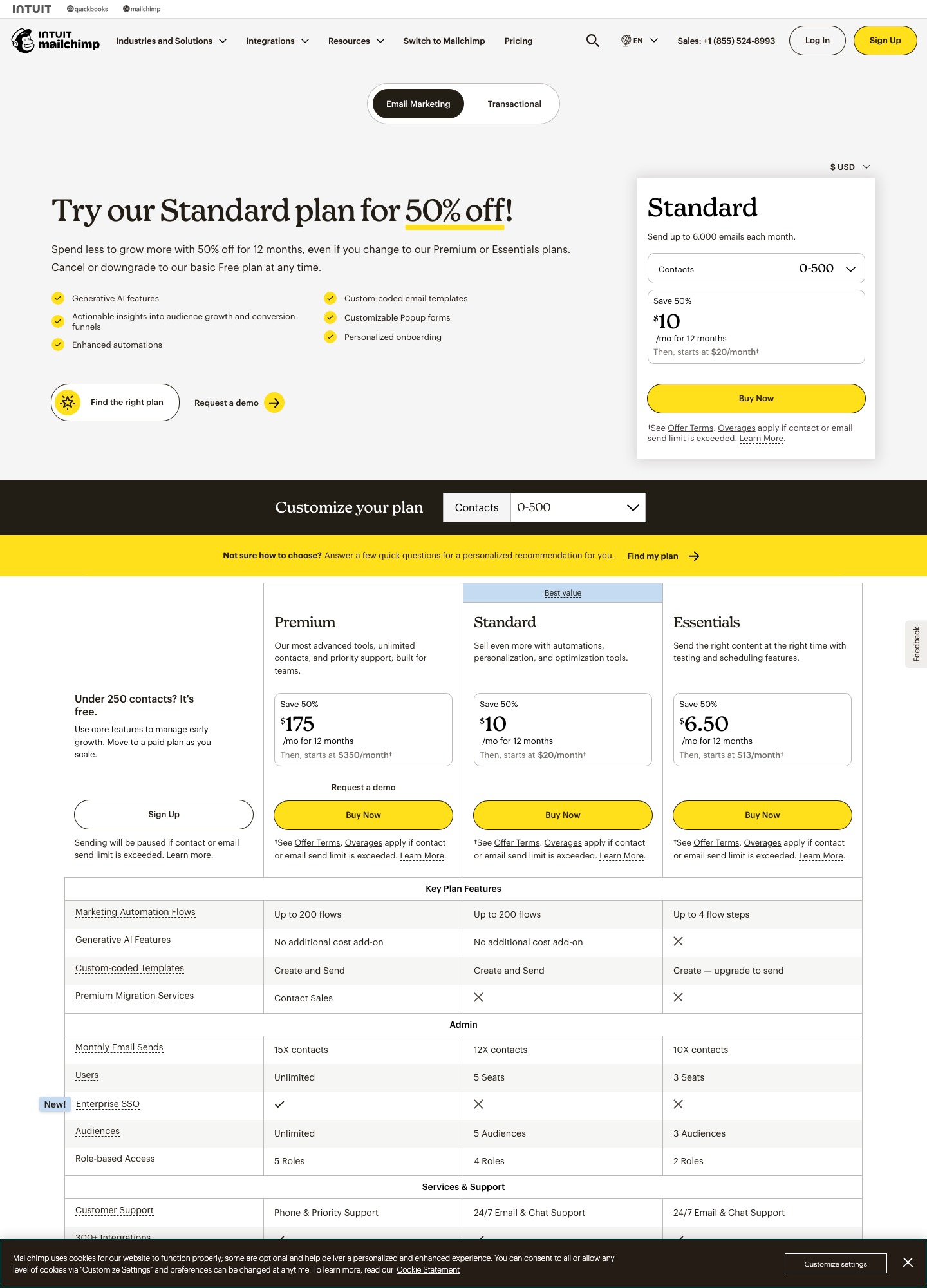
Three paid plans sit above a Free plan. Essentials starts at $13 a month, Standard at $20 and Premium at $350, all at the smallest contact stop, and each paid card carries a 50% first-12-months offer on the capture date. The feature table underneath is where sequence work gets decided: flows are not included on Free, are capped at 4 steps on Essentials, and run to 200 steps per flow with multiple branching points on Standard and Premium. The rest of this page uses the list price that applies after the offer, because that is what a list pays from month 13 onward. The full contact-band ladder is on Mailchimp's email marketing pricing page.
Where Mailchimp pinches welcome, nurture and launch sequences
A 4-step ceiling on Essentials and no flows on Free
A welcome series is rarely one email. Say it is three emails with a two-day wait between each: that is already five steps if every wait counts as a step, and Essentials stops at four. The pricing page words it plainly: Essentials "includes marketing automation flows and flow templates with up to 4 steps per flow", while Standard and Premium allow up to 200 steps per flow, multiple branching points and more. The Free plan, with 250 contacts and 500 sends a month, lists flows as not included. So the cheap rungs of the ladder suit a single autoresponder, and anything with a branch ("clicked the offer or didn't") pushes you to Standard.
Essentials also leaves out dynamic content, custom reports and branded templates, and lets you create custom-coded templates but not send them without upgrading. Dynamic content matters to sequences more than it sounds: it is how one email layout shows a different product block to buyers and non-buyers, and it starts at Standard.
A price that steps up at every contact band
Standard's list prices on the marketing pricing page are $20 a month at the 500-contact stop, $100 for 2,501 to 5,000 contacts, $135 for 5,001 to 10,000, $230 for 10,001 to 15,000 and $310 for 20,001 to 25,000. The page shows the 50% offer next to each: $50, $67.50, $115 and $155 for the first 12 months. The bands between 500 and 2,500 contacts are not in the page text, so read them off the selector for your own count. What matters for planning is the shape: a list that crosses 2,500 contacts lands in the $100 band whether it holds 2,501 people or 5,000, and the next jump is $35 more at 5,001.
Contacts are counted per audience, and the bill follows the peak
Mailchimp's feature table says that "adding a contact to more than one audience will count them toward your plan's contact count as many times as they appear." A shop with a customers audience and a newsletter audience pays for the overlap twice. Its help article on additional charges adds two more details: the monthly bill reflects the highest contact total reached during the billing period even if the number falls later, and going over your tier does not interrupt sending but adds a charge for an add-on contact block. Archived and cleaned contacts do not count toward the limit. The practical consequence is that cleaning a list on the day before renewal is too late for that month.
A send ceiling that scales with contacts, not with your calendar
Monthly sends are capped at 10 times your contacts on Essentials, 12 times on Standard and 15 times on Premium; at the 2,501 to 5,000 band the pricing page says Standard sends up to 60,000 emails a month. That is generous for broadcasts, but sequences consume it too. A 5,000-person list receiving a 10-email nurture in the same month is 50,000 emails, which leaves 10,000 for everything else in the 60,000 allowance if automated sends are counted against the ceiling, as Mailchimp's wording ("the maximum number of emails that can be sent per month") suggests. Launch weeks are where this shows up, so do the multiplication before a launch, not after.
The shortlist, ranked for a Mailchimp user who lives in automation flows
1. MailerLite: the default for a small list that wants Standard-style flows for less
MailerLite suits the owner who liked Mailchimp's editor but not its price ladder. Its automation page lists up to 3 active automations of 5 steps on the Free plan, up to 50 active automations and 100 steps on Comfort, and unlimited automations with up to 100 steps each on Power, with unlimited automation templates on every plan. Triggers include joining a group, clicking a link and completing a form, and conditions split on activity, groups and fields. You gain a much lower bill at 5,000 contacts and a connector that pulls a Mailchimp account straight in; MailerLite's switching guide says duplicates across groups count once toward your plan. You lose Mailchimp's SMS add-on and its 300+ integration catalogue, and multiple triggers on one automation are a Power feature.
Price: MailerLite's pricing page lists Comfort at $19 a month for 1,000 subscribers, then $49 for 5,000 subscribers, $89 for 10,000 subscribers and $179 for 25,000 subscribers on monthly billing. Power is $39, $69, $129 and $239 at the same four stops. The Free plan covers 250 subscribers and 2,500 emails a month.
2. Brevo: for a large list that sends only a few emails a month
Brevo prices on email volume rather than list size, which flips Mailchimp's logic. Brevo's plans article says the Free plan keeps storage for up to 100,000 contacts with 300 sends a day, and that marketing automation on Free is limited to 2,000 contacts. Starter and Standard start at 5,000 emails a month, with 500 contacts stored on that first tier, and Standard is where automation covers unlimited contacts, plus A/B testing and send-time optimisation. You gain a free tier that does not delete anyone and a price that does not rise when the list is dormant. You lose a flat, easy-to-read ladder: the page's tiers pair each send volume with a contact ceiling (10,000 sends with up to 1,500 contacts; 15,000 with up to 2,500; 20,000 sends and above with up to 500,000), so a 5,000-person list that gets four emails a month needs the 20,000-send tier, and you read that price off the slider.
Price: Starter starts at $9 a month and Standard at $18, both at 5,000 emails a month; Starter adds a "Sent by Brevo" footer unless you buy the $9 a month logo-removal add-on, all per Brevo's pricing page and plans article.
3. Kit: the pick when the list is an audience you sell to
Kit (formerly ConvertKit) is the better home if your launch sequence ends in a digital product, course or paid newsletter rather than a shop checkout. Kit's pricing page puts unlimited Visual Automations and unlimited email sequences on Creator, keeps tagging and segmentation on Free, and lists selling digital products and subscriptions on Free too. Its CSV import help article names a dedicated importer for Mailchimp. You gain tag-based automation with unlimited sequences and no step cap; you lose the Free plan's usefulness for sequences, since the free tier covers up to 10,000 subscribers but no sequences. Compare it with the other creator tool in ConvertKit vs Drip.
Price: Creator is $33 a month at 1,000 subscribers with yearly billing ($390 a year); the selector reads $75 at 5,000, $116 at 10,000 and $166 at 25,000. Pro starts at $66, shown at $50 for the first year.
4. ActiveCampaign: when a sequence has to react to sales activity
ActiveCampaign is for the small business whose nurture ends in a conversation: a quote request, a booked call, a deal stage. It is heavier than a newsletter tool and the contact curve is steeper. Its pricing page lists four email plans with Starter limited to 5 actions per automation and one user, so a welcome series with several emails and waits outgrows it quickly, and there is no free plan. You gain a standard CRM from the entry plan, plus segmentation that deepens as you move up; you lose simplicity and a free way to start. The two vendors' deeper automation differences are covered in alternatives to ActiveCampaign.
Price: on annual billing Starter is $15 and Plus $49 at 1,000 contacts. At 5,000 contacts Starter is $79 and Plus $145; at 10,000, $149 and $189; at 25,000, $391 and $389, so Plus is the cheaper of the two at that size.
5. Flodesk: for design-led emails on a modest price ladder
Flodesk is the choice for a boutique or personal brand where the emails themselves are a design asset. Flodesk's pricing page prices by active subscriber, lists unlimited email sends, and splits plans by workflows: Lite includes 1 workflow, Pro unlimited workflows and integrated checkout. That single-workflow limit means Lite carries your welcome series and nothing else. You gain a compact tool and a price that climbs more slowly than Mailchimp's bands; you lose Mailchimp's 300+ integration count, so check Flodesk's integration list for the apps you rely on.
Price: Pro is $28 a month at 1,000 subscribers on monthly billing, $59 at 5,000, $79 at 10,000 and $169 at 25,000; Lite is $25, $52, $72 and $162 at the same stops (Lite at 2,500 is $32).
6. Omnisend: for a store whose sequences run on shopping behaviour
Omnisend is worth a look if the Mailchimp account sits behind a store, since its feature list names marketing automation, SMS campaigns, web push and a product recommender. Its pricing page says you are billed for subscribers and non-subscribers who received automated messages, and that unsubscribed contacts are not billed, which is a cleaner rule than counting an address once per audience. You gain a retail-leaning feature set and a free plan with the same 250-contact and 500-email ceilings as Mailchimp's Free. You lose a plain price: the page shows $11.20 a month for Standard (500 contacts, 6,000 emails) as a 30%-off, first-three-months offer rate, and the regular rate is not stated in the readout, so check Omnisend's pricing page for what month four costs.
7. Klaviyo: the data-heavy option, not the cheap one
Klaviyo earns a place only when your sequences depend on store order and product data and you accept paying for that depth. Its pricing page prices email by active profiles and offers a free plan of 250 profiles and 500 sends a month. You gain ecommerce depth and a send allowance of 50,000 emails a month at 5,000 profiles; you lose the cost argument entirely, as the table below shows. A head-to-head with a CRM-led rival is in Klaviyo vs ActiveCampaign.
Price: Email is $20 a month at 500 profiles, $30 at 1,000, $60 at 2,500, $100 at 5,000, $150 at 10,000 and $400 at 25,000.
Five, ten and twenty-five thousand contacts: the monthly bill side by side
| Plan with multi-step automation | 5,000 contacts | 10,000 contacts | 25,000 contacts |
|---|---|---|---|
| Mailchimp Standard (list price) | $100 (2,501-5,000 band) | $135 (5,001-10,000 band) | $310 (20,001-25,000 band) |
| MailerLite Comfort (monthly billing) | $49 | $89 | $179 |
| MailerLite Power (monthly billing) | $69 | $129 | $239 |
| Kit Creator (page's default yearly toggle) | $75 | $116 | $166 |
| Flodesk Pro (monthly billing) | $59 | $79 | $169 |
| ActiveCampaign Plus (annual billing) | $145 | $189 | $389 |
| Klaviyo Email (monthly) | $100 | $150 | $400 |
The assumptions: each row is the cheapest plan on that vendor that lists multi-step automation, the Mailchimp row ignores its first-year offer, billing bases differ as labelled, and "contacts", "subscribers" and "profiles" are treated as the same thing. Brevo is left out because it prices by sends and its page shows only starting prices. The arithmetic for a year at Mailchimp's list price comes out as follows, with the derived figures written in words. At 5,000 contacts, Standard's $100 minus Comfort's $49 leaves a gap of 51 dollars a month, or 612 dollars a year (51 times 12). At 10,000 contacts the gap is 135 minus 89, which is 46 dollars a month and 552 dollars a year. At 25,000 contacts it is 310 minus 179, which is 131 dollars a month and 1,572 dollars a year. Set against Power, the like-for-like feature set at 25,000 contacts, the gap is 71 dollars a month, or 852 dollars a year. Kit lists Creator at $166 for 25,000 subscribers. That is 144 dollars below Mailchimp's list price (1,728 dollars a year). Klaviyo's $400 is 90 dollars above it, and ActiveCampaign Plus at $389 is 79 dollars above.
Year one is a different story if Mailchimp's 50% offer applies to you. Its 2,501-5,000 band shows $50 a month for 12 months, which is 600 dollars. MailerLite Comfort at 5,000 contacts costs 588 dollars over the same period. The decision is really about year two, when 1,200 dollars at Mailchimp meets 588 dollars at MailerLite.
Leaving Mailchimp: exports, suppression files and a three-week overlap
Mailchimp is unusually generous with the data it lets you take, and unusually silent about the logic. Two exports matter, and they are different things.
- The contact export. Per Mailchimp's export article, Audience, then Export audience, produces a CSV (a ZIP with separate CSVs for subscribed, unsubscribed, non-subscribed and cleaned contacts). Only Owners and Admins can do it, the files stay in your account for 30 days, and the export contains no open or click data, so pull email reports separately if you want history.
- The account export. Mailchimp's backup article lists emails (with HTML and text content), reports, audiences, templates, gallery files, events and ecommerce data as exportable, allows one export per 24 hours, and says it can take up to 24 hours. It does not list automation flows, and landing page content cannot be exported. That is the gap to cover with screenshots.
The consent traps are all about the files. A contact sitting in two audiences appears in both exports, so merge and de-duplicate before you import anything. The unsubscribed file and the cleaned file (addresses that hard bounced or repeatedly soft bounced, in Mailchimp's own definition) are not lists to mail, they are your suppression file. Destinations treat them differently: MailerLite's Mailchimp switching guide lets you bring unsubscribed contacts across into their own category where they cannot be sent newsletters, whereas a plain CSV import there may reject addresses that are already unsubscribed. Brevo's blocklist import article says that when you migrate you must import blocklisted contacts and gives a blocklist tick-box on the import. Kit's import article is silent on unsubscribed addresses, so keep that file out of an import into Kit until you have asked Kit support what it does with them.
Two more things do not carry over. Segments: MailerLite's guide says it recreates only basic, field-based segments and that behavioural, ecommerce-based and advanced segments must be rebuilt by hand. Consent proof: the same guide suggests keeping Mailchimp's opt-in IP column in a custom field so you retain evidence of when and how someone signed up, which is worth doing before you discard the original files.
An overlap plan with days attached
- Day 1. Run both exports and download them. Screenshot every flow: trigger, each email, each wait, each exit. Note which flows are active today.
- Days 2 to 3. Authenticate your sending domain in the new tool before sending anything, import the subscribed file, and load the suppression file as the destination allows. If you import into Kit, pause its automations first: its import article warns that adding subscribers to tags, forms or sequences can start automations.
- Days 4 to 10. Rebuild the welcome flow first, then nurture, then launch. Run three seed addresses through each, including one that unsubscribes mid-way.
- Day 11. Point your signup forms at the new tool. Leave Mailchimp's flows running so people already inside finish them; a 14-day welcome series started on day 10 empties around day 24.
- Days 24 to 28. Export the audiences again to catch unsubscribes and bounces since day 1, import them as suppressions, and use MailerLite's "Sync again" if you used its Mailchimp connector.
- Day 30 or your billing date. Because Mailchimp bills on the peak contact count in the period, cancel or downgrade at the start of a billing cycle, not the end. The pricing page offers a downgrade to the Free plan, but its 250-contact ceiling makes it worth checking what happens to a larger audience before you rely on it.
For the general version of this process, with a checklist for any pair of tools, see the email sequence tools migration guide.
When paying Mailchimp is still the sensible call
Take a yoga studio with 450 contacts and one four-step welcome flow, an enrolment email, a reminder, a testimonial ask and a class offer. Essentials at $13 a month is priced for exactly that case, the 4-step cap does not bind, and a migration would cost more in rebuilt templates than a year of the difference. Stay too if your promotions depend on Mailchimp's SMS add-on, which the pricing page lists for Essentials (SMS) and Standard and Premium (SMS and MMS), because splitting email and text across two vendors adds a second consent record. And stay if a team of three to five uses Mailchimp daily: Standard includes 5 seats and Essentials 3, and retraining often costs more than the fee gap on a list under 2,500.
If you are still weighing the options, the alternatives directory and the tools index cover the other platforms, and email sequence tools for small-business lead nurturing ranks them for the same reader without a Mailchimp starting point.
Frequently asked questions
Is Mailchimp's free plan enough for a welcome email?
Not for an automated one. Mailchimp's pricing page gives the Free plan 250 contacts, 500 sends a month with a ceiling of 250 a day, and its feature table marks marketing automation flows as not included on Free. You can send a broadcast to new people by hand, but a triggered welcome series needs Essentials (flows of up to 4 steps) or Standard (up to 200 steps per flow).
Why did my Mailchimp bill jump when the list barely grew?
Standard is priced by contact band, so crossing a boundary moves you to the next price: the pricing page lists $100 a month for 2,501 to 5,000 contacts and $135 for 5,001 to 10,000. Mailchimp's help article on additional charges also says the bill follows the peak contact total during the billing period, and that going over a limit adds charges for an add-on contact block rather than stopping your service. A person who sits in two audiences counts once per audience, which can push you over a band without any new signups.
Which Mailchimp contacts should I export before leaving?
All of them, as separate files. Mailchimp's export article says an audience export can come as a ZIP with different CSVs for subscribed, unsubscribed, non-subscribed and cleaned contacts, and that the files stay in your account for 30 days. Import only the subscribed file as live contacts, and keep the unsubscribed and cleaned files as the suppression list for whatever tool you move to.
Will my Mailchimp automations move to the new tool?
The vendor pages read for this guide describe no import of Mailchimp flow logic. MailerLite's switching guide treats automations, templates, forms and landing pages as things you rebuild by hand, and the contents of Mailchimp's own account export (emails, templates, reports, audiences and similar data) do not list flows. Screenshot each flow with its triggers, waits and exit conditions before you start, then rebuild it from the screenshots.
Does the 50% first-year offer make Mailchimp competitive?
For one year, close. At 2,501 to 5,000 contacts Mailchimp's pricing page shows a first-12-months offer of $50 a month, which is 600 dollars for the year. MailerLite Comfort at 5,000 subscribers comes to 588 dollars over the same twelve months. In year two the Mailchimp band is back to its list price of $100 a month, 1,200 dollars for the year, so the gap reopens at 612 dollars. Judge the price you will pay in month 13, not month 1.