Brevo Alternatives for Email Sequences
Leave Brevo when its tiers pay for contacts you cannot store or sends you do not make, when you want transactional mail billed apart from marketing, or when your sequences start from product events. The default for the commonest reason, a list that needs a bigger send tier just to fit, is MailerLite, which prices on subscribers alone. Stay if you send little per contact: at 10,000 contacts and 2 emails each, Brevo Standard reads $69 and MailerLite Comfort $89. Move to Loops or Customer.io if the sequence is about what users do in your app.
Brevo in short, and the page behind it
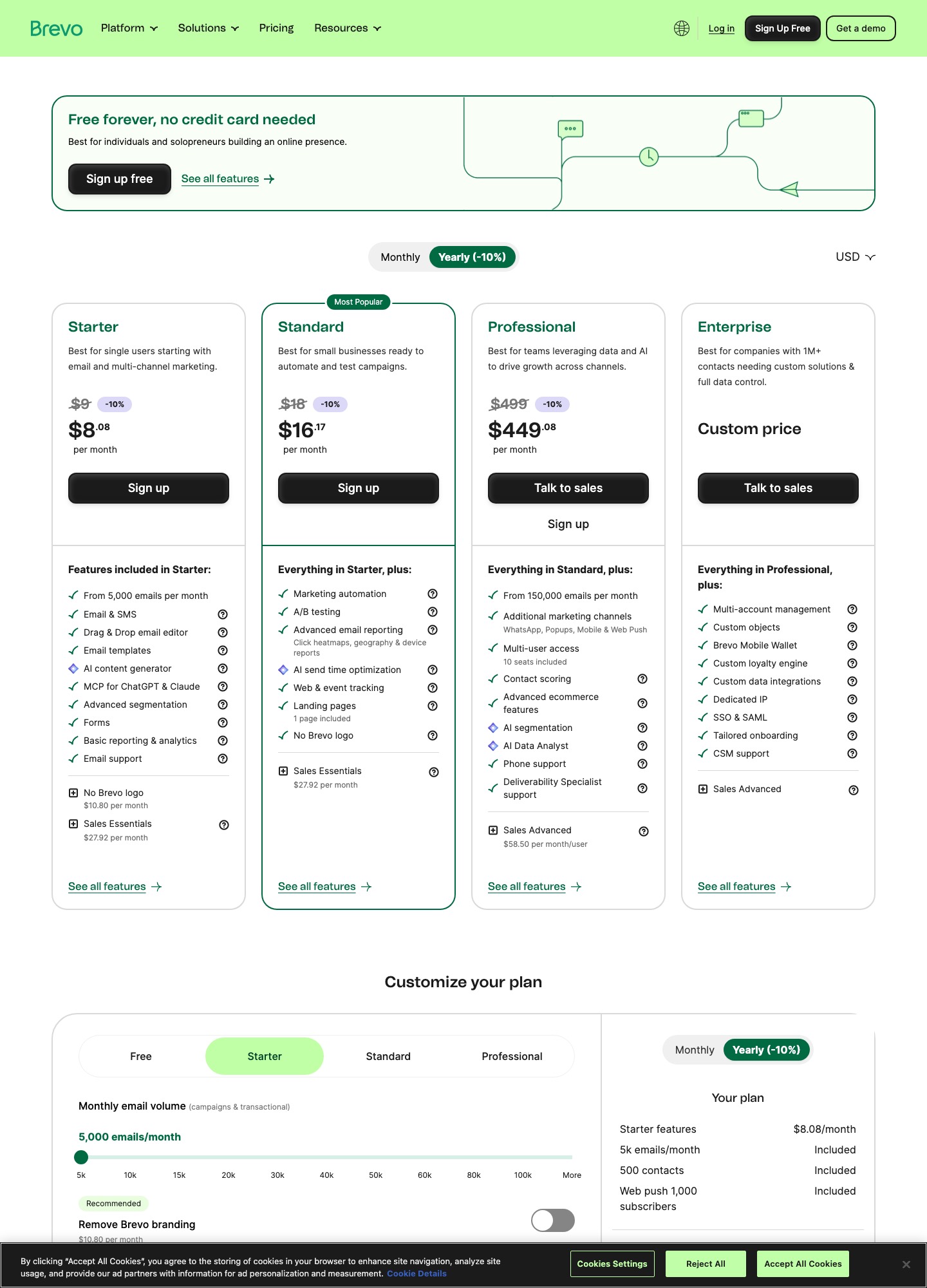
Brevo sells email, SMS, WhatsApp, chat, sales tools and transactional sending as one product, with plans named Free, Starter, Standard, Professional and Enterprise, priced by the monthly email volume you select. Its pricing page shows Starter from $9, Standard from $18 and Professional from $499 a month, with a 10% reduction for yearly billing.
Why Brevo stops fitting: five limits it documents itself
- One meter for two kinds of mail. The slider on the pricing page is labelled "Monthly email volume (campaigns & transactional)", and the help article says prepaid credits serve both. A welcome sequence and your password resets draw from the same allowance, so a launch broadcast can leave less for receipts.
- Contact storage rides on the send tier. Per Brevo's pricing help article, the 5,000, 10,000 and 15,000 send tiers store up to 500, 1,500 and 2,500 contacts; from 20,000 sends the limit is 500,000. Pass a limit and Brevo upgrades you to the next tier on its own, with the price following.
- Automation is capped on the cheap plans. Free lists multi-channel marketing automation "up to 2,000 contacts" and Starter inherits the Free features, with that 2,000-contact limit also applying to prepaid credits. Standard lists marketing automation for unlimited contacts, which is the real difference between $9 and $18 at the first tier.
- Brand and seats cost extra. Starter emails carry a "Sent by Brevo" footer unless you buy the Remove Brevo logo add-on (the help article says $9 a month; the pricing page capture reads $10.80, so confirm at checkout). Standard includes 1 marketing seat and allows up to 3 users, with extra seats at $9 each per the help article and $10.80 each on the pricing page.
- The sequence product for sales sits at the top. "Outreach sequences" belong to the Sales Advanced package at $64 a month, which the help article offers only on Professional and Enterprise. Professional starts at $499, so a 1:1 sales sequence in Brevo means $499 plus $64 before any volume choice.
Which Brevo are you leaving: campaigns or transactional?
Most people reading about Brevo sequences are leaving one of two halves. If it is the marketing half (welcome series, nurture, broadcasts), you need an automation builder and a subscriber-based price, and the first three tools below fit, as does the Marketing tab of tool 4. If it is the transactional half (receipts, resets, alerts), you need an API sender with its own meter, and Resend or Postmark fits. If you use both, expect to move in two steps rather than one, because the two halves have different suppression behaviour in Brevo: its help article on blocklisted contacts says a transactional unsubscribe blocks the contact only from the sender of that email by default, so they can still get transactional mail from another sender. Brevo's own article on blocklisting from both channels uses two automations to keep them in sync. For the wider split, read transactional vs marketing email.
Seven replacements, hand-ranked
1. MailerLite: subscriber pricing without a send meter
Comfort reads $19 at 1,000 subscribers, $49 at 5,000 and $89 at 10,000; Power reads $39, $69 and $129, per MailerLite's pricing page. Comfort sends 10x your subscriber tier a month and Power is unlimited, so there is no tier to buy just to store a list. Its automation page gives 3 active automations and 5 steps on Free, 50 and 100 on Comfort, and unlimited automations with up to 100 steps on Power. You lose Brevo's all-in-one range: transactional mail is a separate MailerSend product and there is no sales area on the pages read. EU data storage with ISO 27001 is stated on the pricing page.
2. Loops: for sequences that follow what users do
The free plan covers up to 1,000 of your newest contacts and 4,000 sends in any rolling 30 days with all features included; paid reads $48 at 4,788 subscribers and $99 at 9,998 on Loops' pricing page. Paid plans include transactional sends to users outside your audience at no additional charge, and the page says it does not charge for team seats, which removes Brevo's seat meter. Its pricing page lists email plans only, so Brevo's SMS and WhatsApp channels have no counterpart there. See Loops vs Resend for the two side by side.
3. Customer.io: event-driven journeys at a higher floor
Essentials reads $100 a month at 5,000 profiles, $145 at 10,000 and $235 at 20,000, billed monthly, with 1 million emails a month included and transactional email in every plan, per Customer.io's pricing page. Essentials does not include managed deliverability. The floor is $100 against Brevo Starter's $9 starting price, so it suits teams whose sequences are the product. Compare it in Customer.io vs Loops.
4. Resend: marketing and transactional behind one vendor
Resend's pricing page has a Marketing tab: free at 1,000 contacts with unlimited broadcast sending, 10,000 automation runs and 3 segments, then $40 at 5,000 contacts and $80 at 10,000. Its transactional tab starts with a free tier of 3,000 emails a month (100 a day) and $20 for 50,000 on Pro. That is the closest swap if you want Brevo's two halves from one vendor but with developer tooling; the thing to check is that the free tier's 10,000 automation runs covers your sequence volume.
5. Postmark: the transactional half only
Postmark's pricing page reads Basic $15, Pro $16.50 and Platform $18 at 10,000 emails a month, and $55, $60.50 and $66 at 50,000, with a free plan of 100 emails a month. It lists no automation or sequence feature, so use it for receipts and resets and put sequences in tool 1, 2 or 3. Read Postmark's pricing page and Resend vs Postmark before choosing.
6. ActiveCampaign: when you want depth Brevo does not sell
Its pricing page reads Starter $15, Plus $49 and Pro $79 at 1,000 contacts, billed annually, rising to $79, $145 and $205 at 5,000 and $149, $189 and $375 at 10,000. Starter caps each automation at 5 actions, so sequence work means Plus, which costs more than Brevo at every size in the table below. Take it only for the automation depth and CRM; Brevo vs ActiveCampaign has the feature comparison and ActiveCampaign's pricing page the numbers.
7. Kit: for creators, not for stores or apps
Kit's free plan covers up to 10,000 subscribers, but sequences and visual automations start on Creator at $33 a month for 1,000 subscribers, $75 for 5,000 and $116 for 10,000 per kit.com/pricing. The page lists a 14-day trial and free migrations. The page lists no transactional email, which is the line to check if Brevo is also your receipt sender.
Prices at 1,000, 5,000 and 10,000 contacts
Monthly list prices in US dollars from each vendor's own page on 7 October 2026, monthly billing except Kit (rates shown with yearly billing) and ActiveCampaign (billed annually). Brevo prices on sends, so its row assumes each contact receives 2 emails a month and uses the cheapest Standard tier that can also store the list: the 10,000-send tier for 1,000 contacts (stores up to 1,500), and the 20,000-send tier for 5,000 and 10,000 contacts (2 x 10,000 = 20,000 sends at the top).
| Tool and plan | 1,000 contacts | 5,000 contacts | 10,000 contacts |
|---|---|---|---|
| Brevo Starter | $17 | $32 | $32 |
| Brevo Standard | $35 | $69 | $69 |
| MailerLite Comfort | $19 | $49 | $89 |
| MailerLite Power | $39 | $69 | $129 |
| Loops | $0 (free plan) | $48 (at 4,788) | $99 (at 9,998) |
| Resend Marketing | $0 (free tier) | $40 | $80 |
| Kit Creator | $33 | $75 | $116 |
| Customer.io Essentials | no stop below 5,000 | $100 | $145 |
| ActiveCampaign Plus (annual billing) | $49 | $145 | $189 |
The crossover is worth working out. At 10,000 contacts and 2 emails each, Brevo Standard at $69 is $89 - $69 = $20 a month under MailerLite Comfort, or $240 a year. Raise the volume to 5 emails per contact, 50,000 sends, and Brevo Standard reads $97 on its slider, $8 above Comfort's $89 and still below Power's $129. At 5,000 contacts the order flips the other way, because Brevo's tier is set by storage: $69 against Comfort's $49 is a $20 monthly premium, $240 a year, for contacts Brevo cannot hold on a cheaper tier. Loops' free plan is a $0 option at 1,000 contacts only while sends stay under 4,000 in 30 days (2 x 1,000 = 2,000 here), and it covers just the 1,000 newest contacts.
Getting your data out of Brevo without losing the opt-outs
- Export with the subscription status. Brevo's export article has you open CRM, Contacts, select all contacts, choose More actions then Export, pick attributes (EMAIL, LAST CHANGED and CREATION DATE are preselected), open the Subscriptions section to include subscription status, and choose a comma or semicolon separator. The file arrives through the bell notification. Tick List ID under System data if the same contact sits on several lists.
- Count the blocklisted people you are paying for. The blocklist article says blocklisted contacts still count toward your total contacts, so the file you export may be larger than the audience you can mail. Split it before import.
- Pull the transactional blocklist separately. Brevo's article on unsubscribed contacts puts that list at Settings, Transactional emails, Blocked or Unsubscribed contacts, while campaign unsubscribes come from a contact filter (Email, Unsubscribed from emails, Email campaign). Two lists, two sources, one suppression file in the new tool.
- Do not delete the opt-outs. Brevo's own advice is to keep blocklisted contacts in the account so they are not re-imported as subscribed. That protection is Brevo's; once you leave, the exported status column is all you have.
- Rebuild automations by hand. The export covers contacts and attributes. Nothing in the articles above describes exporting an automation workflow, so list the ones that earn money and rebuild those first.
A 30-day overlap that fits Brevo's billing: day 0, export contacts with subscription status and the transactional blocklist, and note whether your plan is monthly (pausable up to 3 months) or yearly (not pausable). Days 1 to 2, load suppressions first, then active contacts, and send to your own addresses. Days 3 to 10, rebuild the welcome and one nurture sequence and run them against staff. Day 11, point new signups at the new tool and stop new entries into the matching Brevo automation. Days 12 to 24, route one low-risk transactional message, such as a receipt, through the new sender and compare delivery. Days 25 to 28, export Brevo unsubscribes again and import the delta. Day 29, move the rest of transactional traffic; day 30, cancel. More in the migration guide and the deliverability guide.
When Brevo is still the better answer
Stay if you run a shop or clinic with 3,000 to 10,000 contacts, mail them once or twice a month, and use SMS and the built-in CRM, since the Standard tier at 20,000 sends stores up to 500,000 contacts for $69 and the help article includes 50 open deals and a pipeline on every plan. Stay if you are on the free plan, under 300 sends a day, with fewer than 2,000 contacts in automations. Leaving means finding separate homes for SMS, WhatsApp and the built-in sales area, since the seven tools above are priced as email products (ActiveCampaign lists SMS and WhatsApp as add-ons). Compare the wider field in the alternatives directory and the tools directory.
What Brevo leavers ask first
Do I lose my Brevo blocklist when I leave?
Brevo keeps blocklisted contacts out of your sends only while they stay in Brevo. Its help article on blocklisted contacts says to keep them in the account rather than delete them, partly so you do not re-import them as subscribed by mistake. Export the subscription status with your contacts, load the unsubscribed and blocklisted addresses into the new tool as suppressed before anyone else, and keep the file for as long as you send.
Why does my Brevo plan jump when I add contacts?
Brevo's pricing help article says the email volume you choose sets your tier and that the tier sets how many contacts you can store: up to 500, 1,500 or 2,500 on the first three tiers, with warnings as you approach them. If you pass the limit it upgrades you to the next tier automatically and the price rises. That is why a 10,000-send plan and a 5,000-contact list cannot sit together.
Is Brevo's free plan enough for a small sequence?
It can be. The free plan is listed as free forever with 300 daily email sends, storage for up to 100,000 contacts and multi-channel marketing automation for up to 2,000 contacts, plus transactional email. The ceiling is the daily cap: a 3,000-person list cannot receive one broadcast in a day, and a sequence step that fires for many people on the same day runs into the same cap.
Can I keep Brevo for transactional mail and move only the sequences?
Yes, and it is a reasonable first step because the two halves are separate in Brevo. Transactional unsubscribes are tracked apart from campaign unsubscribes, and by default a transactional unsubscribe blocks only that one sender. The cost is a second suppression list to keep in sync by hand, so write down which tool owns unsubscribes for which kind of mail before you split.
What is the cheapest way to pause Brevo while I test a replacement?
Brevo's help article says a monthly subscription can be paused for up to 3 months and that yearly plans cannot be paused, and that switching between monthly and yearly means cancelling first and choosing the new billing frequency after the cancellation takes effect. If you are on a yearly plan, note the renewal date now, because the 10% yearly discount comes with that lock.