Sequenzy vs HubSpot: Email Sequences, Cost and Fit
Sequenzy vs HubSpot for email sequences: where each wins, cost at 1,000, 5,000 and 10,000 subscribers, who should pick which, and how to migrate.
Choose HubSpot when marketing, sales and service should share one CRM record. Choose Sequenzy if you are a SaaS team billing through Stripe, Paddle or Lemon Squeezy that only needs billing-triggered email sequences, without a CRM suite. HubSpot is sold by seat and contact tier and Sequenzy by emails sent, so the two bills grow in different directions, as the cost section shows.
One suite or one tool: the side-by-side
The decision is less "which sends better email" than "who owns the customer record". HubSpot treats email as one module on top of a CRM, and Sequenzy treats the CRM as someone else's job.
| Feature | Sequenzy | HubSpot |
|---|---|---|
| What you buy | An email platform with sequences, campaigns and a transactional API | Marketing, sales and service hubs around one CRM |
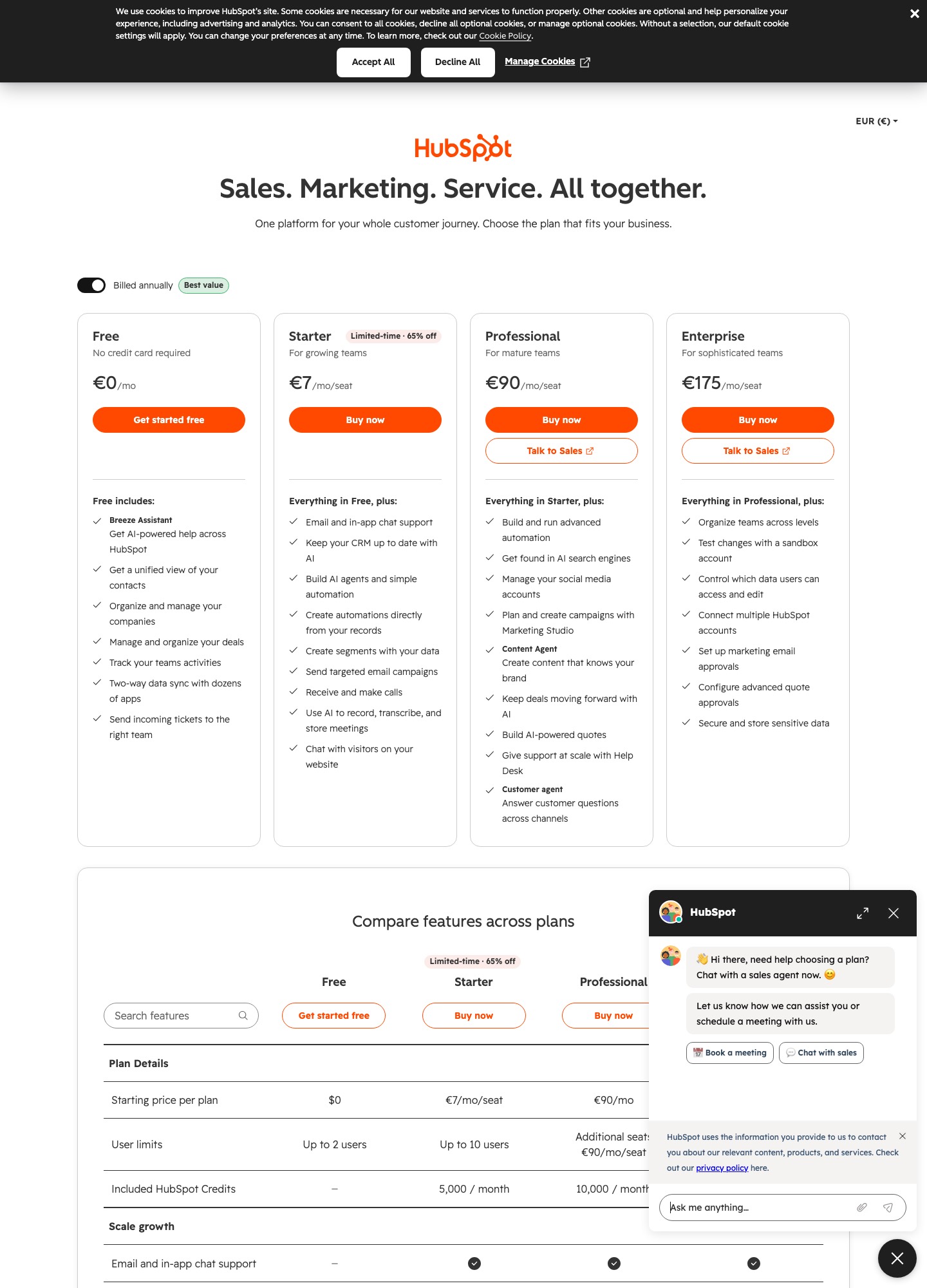
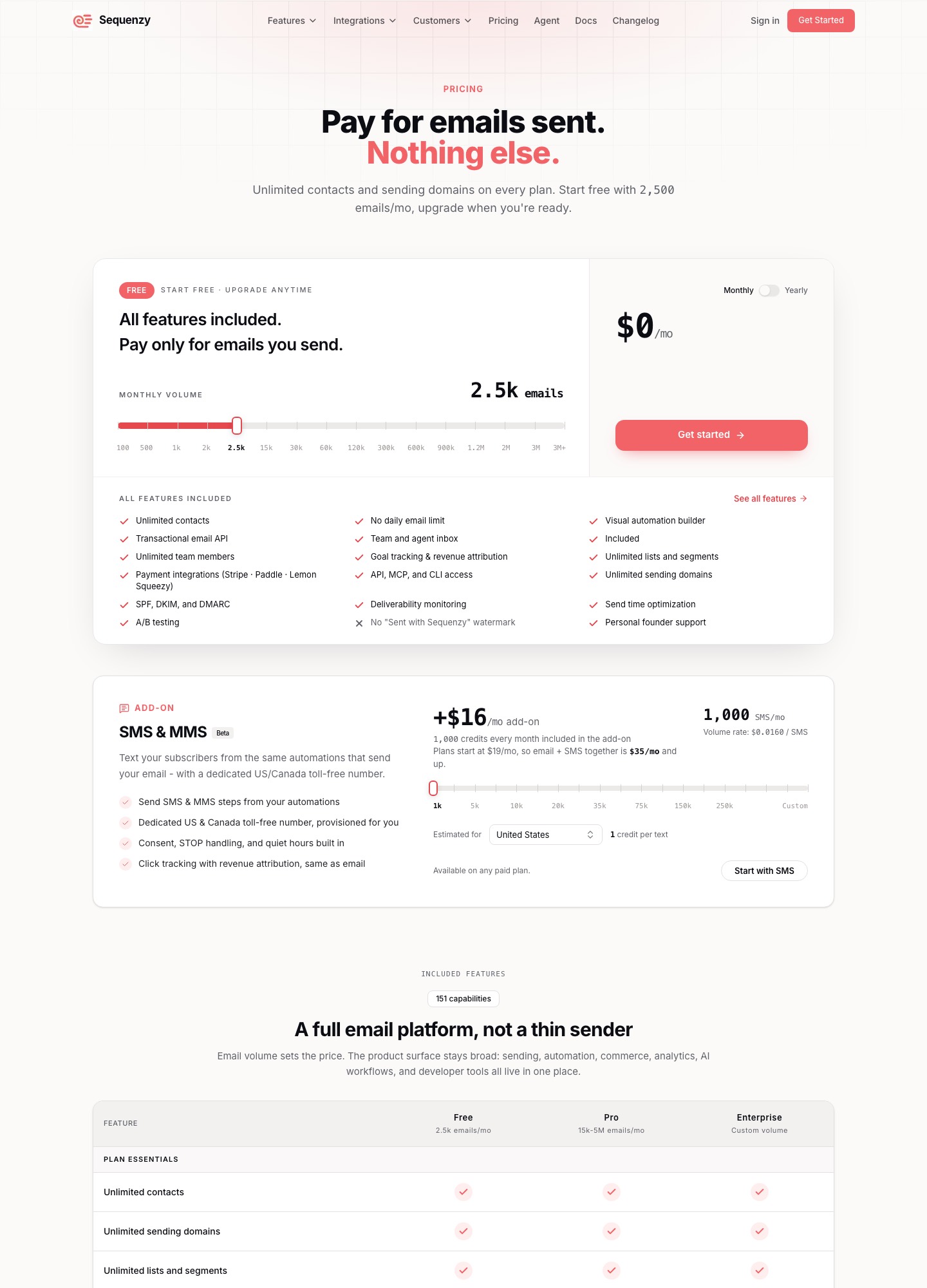
| Pricing unit | Emails sent per month; unlimited contacts and sending domains | Per seat, plus a contact tier (Marketing Hub) |
| Free tier | 2,500 emails a month, every feature included | Free tools at no cost; Sales Hub free for up to 2 users |
| Paid plans listed | $19 (15,000 emails), $29 (30,000), $49 (60,000), $99 (120,000) a month | Marketing Hub from $7 (Starter), $800 (Professional), $3,600 (Enterprise) a month |
| Email automation limit | Visual automation builder on every plan | 1 automated action free, up to 10 on Starter, unlimited on Professional and Enterprise |
| Billing-event triggers | Stripe, Paddle and Lemon Squeezy; failed-payment dunning email with a card-update page | Not on the pricing pages we read; check HubSpot's app marketplace for your billing tool |
| Built-in CRM | No | Yes: contacts, deals, tickets, pipeline |
| One-to-one sales sequences | Not a sales-rep tool | Sales Hub Professional and up, from $90 per seat a month plus a $1,500 one-time onboarding fee |
| Data processing terms | Not stated on the pages we read | Data processing agreement published at legal.hubspot.com/dpa |
Sequenzy figures are from its pricing page; HubSpot's are from its Marketing Hub and Sales Hub pricing pages, with the data processing agreement at legal.hubspot.com/dpa, all read on 7 October 2026.
HubSpot uses the word "sequence" for two different tools
Before comparing automation features, pin down which HubSpot feature you would actually use, because the name covers two products. HubSpot's sequences documentation describes a series of timed email templates that a rep sends one-to-one, with optional follow-up tasks, and says the emails go out through the rep's connected individual work email address, "not through HubSpot's marketing email servers". Contacts can be set to leave a sequence when they reply or book a meeting. This is the outbound-selling tool, and on the Sales Hub pricing page it starts at the Professional tier, which lists 5,000 sequences per account and up to 500 sequence emails per user per day, rising to 1,000 a day on Enterprise.
Workflows are the other tool. HubSpot's workflow guide describes enrolling records on a trigger, with re-enrollment and unenrollment settings, and its own example is enrolling everyone who submitted a form, sending a marketing email and assigning the contact to a user. A welcome series, a trial-ending reminder or a win-back flow to your customers is a workflow job, and that is the Marketing Hub side, where the pricing page's automation row sets the cap: 1 automated action on the free tier, up to 10 on Starter, unlimited on Professional and unlimited plus omni-channel automation on Enterprise.
Sequenzy has no such split: its automations, campaigns and transactional API sit in one product. The practical consequence is that "does HubSpot have sequences?" is the wrong question for a SaaS team. Ask what the Marketing Hub tier you can afford allows in workflows, and whether your billing events can start them.
Where HubSpot is the stronger choice
The strongest argument for HubSpot has nothing to do with email. HubSpot's CRM page describes a free CRM with no expiry date that covers contact management with communication history, deals, tasks, pipeline management, a reporting dashboard, user permissions and ticketing. Marketing, sales and support staff therefore read the same record. If a sales rep needs to see which onboarding email a lead received before a call, or support wants the ticket history next to the subscription, that record is what you are paying for. Sequenzy has no counterpart to it.
- A shared record across teams. Deals, tickets and email activity attach to one contact, and a workflow can act on associated records, such as updating the company of an enrolled contact (per the workflow guide).
- Free tools to start. The Marketing Hub page lists free tools at no cost and the Sales Hub page lists a free plan for up to 2 users with no credit card. Sequenzy's free tier is also real, at 2,500 emails a month, but it is an email tier, not a CRM.
- Breadth of integrations. HubSpot's CRM page says its marketplace connects the free CRM to over 2,000 business apps and offers two-way data sync with dozens of them. Sequenzy's list is shorter and aimed at billing and product events.
- Controls at the top tier. The Marketing Hub readout lists up to 1,000 workflows for 300 teams on Enterprise, with behavioral events, predictive lead scoring and workflow health monitoring.
- Sales sequences for reps. One-to-one outbound with task reminders, which Sequenzy does not do.
Where Sequenzy is the better fit
Sequenzy wins when the thing that should start an email is a money event rather than a CRM stage, and when a contact count is a poor way to bill you. A few concrete differences, all from Sequenzy's pricing page and home page:
- Priced by emails sent. Contacts and sending domains are unlimited on every plan, so a list that doubles does not move the bill unless you send more.
- Payment events as triggers. Stripe, Paddle and Lemon Squeezy are on the integrations list, with a Stripe-based segment on MRR and lifetime value. Sequenzy's home page says each event starts a flow for a segment built from plan, MRR and engagement data.
- Dunning email. A Stripe
invoice.payment_failedevent starts a dunning email with a card-update page. Retrying the payment still happens in Stripe or Paddle, not in Sequenzy, so it does not replace your billing settings. - A short path to a billing-aware welcome flow. Connect your billing account once, or post your own events with one request, then build the flow in the visual automation builder or have the AI-generated sequence draft it.
- Every feature on the free plan. 2,500 emails a month with no feature gates, and the pricing page lists unlimited team members among the included features.
Cost at 1,000, 5,000 and 10,000 subscribers
The two vendors do not publish a number in the same unit, so this table uses an assumption of ours: four emails per subscriber each month, counting every sequence and broadcast. That gives 4,000, 20,000 and 40,000 sends, which land on Sequenzy's 15,000, 30,000 and 60,000 tiers. HubSpot's Marketing Hub page lists plan prices by tier rather than by list size, so the right-hand column shows the three prices it lists and nothing we would have had to invent for the contact-tier charge.
| Subscribers | Sends at 4 a month | Sequenzy plan | HubSpot Marketing Hub |
|---|---|---|---|
| 1,000 | 4,000 | $19 a month (15,000-email tier) | Starter from $7, Professional $800, Enterprise $3,600 a month; contact-tier charge not in the figures we have |
| 5,000 | 20,000 | $29 a month (30,000-email tier) | Same plan prices; contact-tier charge not in the figures we have |
| 10,000 | 40,000 | $49 a month (60,000-email tier) | Same plan prices; contact-tier charge not in the figures we have |
Read the right column as a floor. HubSpot's page says the price depends on seats and contact tier and does not give a single number for 5,000 or 10,000 contacts, so the real bill is higher than the headline plan price, and only HubSpot's own Marketing Hub pricing page can give it for your list. We do not put a figure on it, and we do not claim either tool is cheaper in general.
A team of three, seats against sends
Seats are where the two models differ most. Take three people who log in to build and send. On HubSpot Marketing Hub Starter, which lists a starting price of $7 per seat a month, that is $7 x 3 seats = $21 a month, and the figure excludes the contact-tier charge, which the page does not give as one number. Starter also caps email automation at up to 10 automated actions, which suits a welcome series and little else.
On Sequenzy, a 5,000-subscriber list sending 20,000 emails a month sits on the 30,000-email tier at $29 a month, and the pricing page lists unlimited team members among the included features, so a third seat adds nothing. The two totals are not like for like: the HubSpot figure leaves out contacts and gives you a CRM, the Sequenzy figure leaves out a CRM and gives you billing triggers.
A sales team is a different order of cost. On Sales Hub Professional, the tier where sequences start, three seats at the listed starting price of $90 is $90 x 3 = $270 a month, and the Sales Hub page says that price excludes a required one-time Professional onboarding fee of $1,500.
Which one to pick, by team
Pick HubSpot if
- A sales team and marketing share contacts, deals and tickets, and the follow-up email should read the same record the rep sees.
- You want to start on the free tools and add hubs as the team grows, accepting that Professional and Enterprise are priced in the hundreds and thousands of dollars a month.
- You need many outside apps connected, or enterprise controls such as 1,000 workflows across 300 teams on the top tier.
Pick Sequenzy if
- You are a SaaS team billing through Stripe, Paddle or Lemon Squeezy with no sales team, and what you need is welcome, trial, dunning and win-back emails that react to billing events.
- Your list could be large but you send little, so unlimited contacts on a sends-based tier beats a seat-and-contact bill.
- You want a setup with no CRM, where the product database and the billing system stay the source of truth.
Use neither if
You want CRM-flavoured automation without HubSpot's seat model, or an email tool with deeper ecommerce or form logic than a SaaS billing tool offers. Our HubSpot vs ActiveCampaign and Brevo vs ActiveCampaign pages compare the nearest suite alternatives, and the ActiveCampaign alternatives list widens the field. If your need is outbound sales email, sales email sequences explains the pattern before you pay for a seat.
Migrating in each direction
From HubSpot to Sequenzy
Export contacts with their properties, lifecycle stage and the lists you still mail, and leave out anyone you no longer email. Bring unsubscribes in first so nobody who opted out receives a send from the new tool. Workflows do not move as files, so before cancelling write down each one's enrollment trigger, delays, branches and exit conditions, then rebuild them as Sequenzy automations around billing events. We have not found an import tool described on either vendor's pages and do not claim one.
Know what you lose. Deals, tickets and the activity timeline live in HubSpot's CRM, and Sequenzy has nowhere to put them, so a company with a sales team should keep the CRM and move only the product emails, if at all. HubSpot publishes a data processing agreement for its customers; export what you need before the account closes, and ask a lawyer about retention duties.
From Sequenzy to HubSpot
Export your subscribers with the plan, MRR and trial fields you stored; they become contact properties in HubSpot, where each contact then counts toward the contact tier you pay for. Billing events will not arrive on their own, so check HubSpot's marketplace for a connector to Stripe, Paddle or Lemon Squeezy, or send events from your own code. Rebuild each sequence as a workflow and check the tier first: Starter allows up to 10 automated actions, so a longer dunning or onboarding flow needs Professional. Keep failed-payment retries in Stripe regardless, and rebuild the card-update email as a workflow step. Our guide to email tools with Stripe integration covers the event side, and trial conversion sequences shows what a billing-aware flow needs.
Frequently asked questions
Is Sequenzy or HubSpot cheaper for email sequences?
It depends on whether you count seats or sends. Sequenzy charges by emails sent with unlimited contacts, so 20,000 sends a month costs $29 and 4,000 sends cost $19. HubSpot Marketing Hub lists plans from $7, $800 and $3,600 a month, with prices by seat and contact tier that its page does not reduce to one figure, so a three-person team on Starter pays $7 x 3 = $21 a month before any contact-tier charge. Neither is cheaper in general, and HubSpot also bundles a CRM that Sequenzy does not have.
Are HubSpot sequences the same thing as HubSpot workflows?
No. HubSpot documents sequences as one-to-one sales emails that a rep sends from a connected work inbox, with enrolled contacts leaving when they reply or book a meeting. Workflows are the separate automation tool that enrolls records on a trigger, such as a form submission, and can send a marketing email. Lifecycle emails to customers or trial users belong on the workflow side, so check the plan limits for workflows, not the sales sequence limits.
Can Sequenzy replace HubSpot if my team also sells?
Not if your reps work deals and tickets inside HubSpot. Sequenzy has no CRM, so deal stages, ticket history and the activity timeline have nowhere to live in it. If a sales team and a marketer share contact records today, keep the CRM, and decide separately whether the billing-triggered emails belong in a second tool.