Sequenzy vs Customer.io: Pricing, Data Model, Channels
Sequenzy vs Customer.io for email sequences: event data model, channels, profile vs per-email billing, costs at 5k, 10k and 20k, and migration.
Choose Customer.io if you want to build data-driven, multi-channel journeys from a clean event stream your own app produces. Choose Sequenzy if you are a SaaS team that mainly needs billing-triggered email priced by volume. They are built on different units: Customer.io bills by profiles, meaning people plus objects, while Sequenzy bills by emails sent and does not count contacts. That one difference decides most of the cost comparison below, and the event data model decides most of the effort.
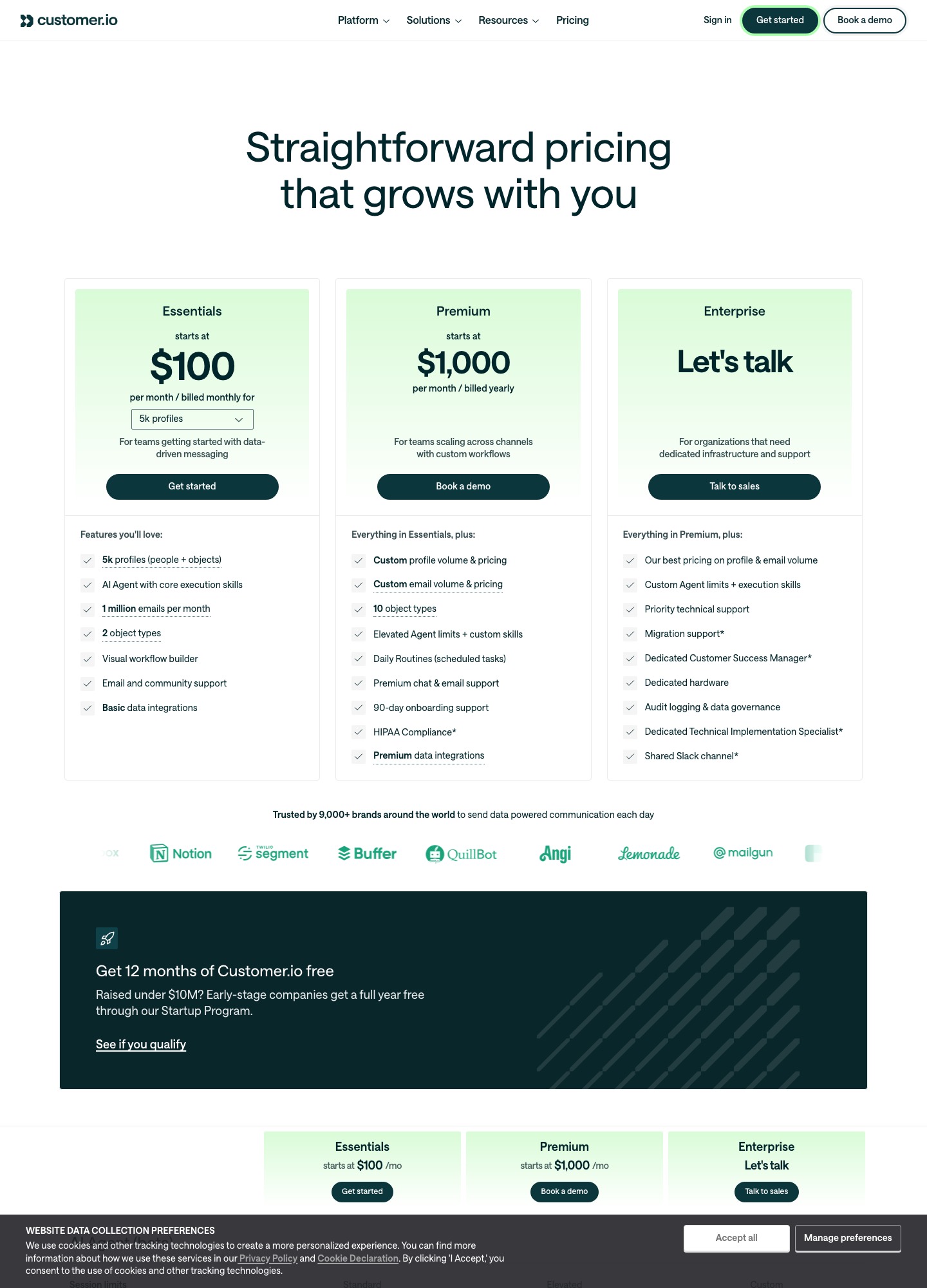
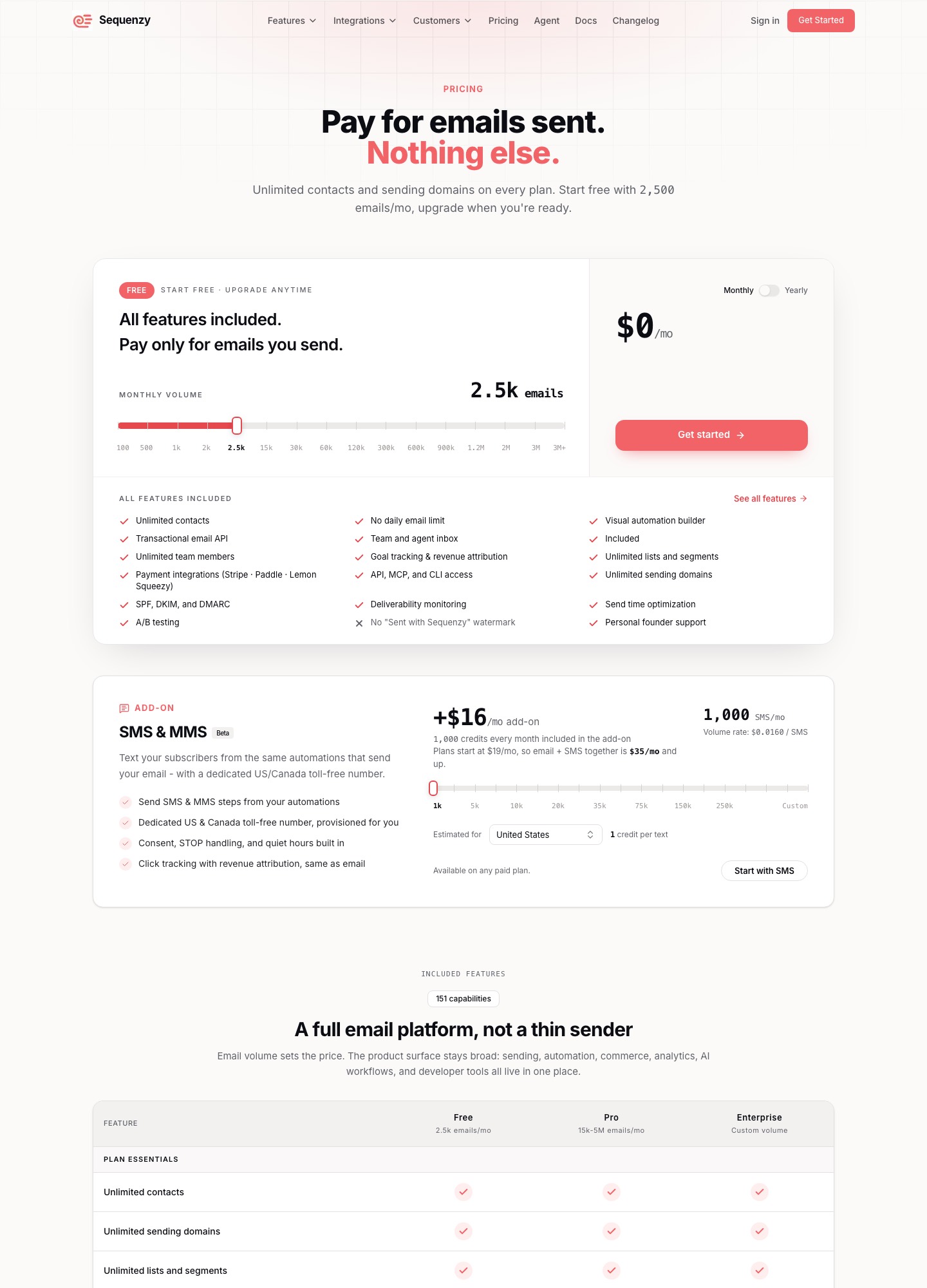
Customer.io's pricing page reads $100 a month for Essentials at 5,000 profiles. Sequenzy's pricing page has a free plan at 2,500 emails a month and a $19 plan at 15,000.
The two products side by side
| Customer.io | Sequenzy | |
|---|---|---|
| Billing unit | Profiles (people + objects) | Emails sent per month; unlimited contacts and sending domains |
| Entry price | Essentials from $100/mo billed monthly, 5k profiles, 1 million emails a month | Free at 2,500 emails a month; $19/mo at 15,000 |
| Higher plans | Premium from $1,000/mo billed yearly, custom profile and email volume; Enterprise on request | $29 at 30,000, $49 at 60,000, $99 at 120,000 emails a month |
| Channels | Email, push, in-app messaging, WhatsApp; SMS volume is custom | Email; SMS and MMS add-on at $16/mo including 1,000 credits |
| Data model | People and objects (2 object types on Essentials, 10 on Premium); custom events with nested properties | Segments built from plan, MRR and engagement data; your own events by API |
| Payment-provider integrations | Basic data integrations on Essentials; billing wiring is yours to build or check | Stripe, Paddle, Lemon Squeezy and others on every plan; dunning email on a failed Stripe payment |
| AI | AI Agent with core execution skills; MCP server | AI-generated sequences; MCP server |
| Transactional email | Part of every plan | API included on every plan |
| Startup offer | 12 months free if you raised under $10M | Free plan with every feature, no card required |
An event stream you design versus billing events you connect
Customer.io's model is the one you build. Its documentation on custom events describes an identify call that creates or updates a person and a track call that records a named event with a dictionary of properties. The properties are nested JSON and can hold objects, arrays and arrays of objects. Events can arrive anonymously before the person is identified, and the order of the two calls does not matter. Beyond people, Essentials allows 2 object types and Premium 10, so non-people records can sit in the same workspace.
Segments follow that data. Customer.io's segments documentation describes data-driven segments, which people enter and leave automatically as the data you send changes, and manual segments, which change only when you add people by CSV, API or workflow. The consequence is that a journey is only as good as the event names and properties you chose. A team that designs a schema once and keeps it stable gets journeys that branch on anything it can express; a team that renames events casually gets silent breakage.
Sequenzy starts from the other end. Its homepage says to connect Stripe or PostHog once, or send your own events with one POST, and that each event starts the right flow for a segment built from plan, MRR and engagement data. Its pricing page lists Stripe, Paddle and Lemon Squeezy among the integrations on every plan, alongside Polar, Creem, Dodo Payments, PostHog, Zapier, n8n, custom webhooks and Clerk. In our read, Customer.io makes you the author of the data model, which is the source of its range and of its setup cost, while Sequenzy hands you a billing-shaped model and asks less of you in return for less freedom to invent your own.
Where each one is stronger
Where Customer.io wins
- Channels. Its pricing page lists email, push, in-app messaging and WhatsApp, with SMS volume set per contract, so a single journey can move someone between channels. Sequenzy sells email and an SMS and MMS add-on.
- A flexible data model. People plus objects, custom events with nested properties, and data-driven segments that keep membership current without manual work.
- Higher tiers. Premium starts at $1,000 a month billed yearly, with custom profile and email volume, 10 object types and managed deliverability, which the pricing page marks as not included on Essentials. Premium also lists HIPAA compliance, and Enterprise is priced on request.
- The Startup Program. Companies that raised under $10M can get a full year free, which Sequenzy's free plan does not match once you outgrow 2,500 emails a month.
- Data location. The pricing page lists US and EU data centers on its plans, and it publishes a data processing agreement.
Where Sequenzy is the better fit
- The bill follows emails sent. Contacts and sending domains are unlimited on every plan, so a list that grows with free signups does not move the price.
- Payment providers are connected for you. Stripe, Paddle and Lemon Squeezy appear on every plan, so the first billing-triggered flow needs a connection rather than an event schema.
- Dunning email. According to its homepage, a Stripe
invoice.payment_failedevent starts a dunning email flow with a card-update page. The retry logic itself stays in Stripe or Paddle, so Sequenzy covers the email, not the recovery of the payment. - AI-generated sequences. They are included on every plan, along with the visual automation builder, goal tracking and revenue attribution.
- Less to design before the first send. This is our judgment, not a timed test: with billing events arriving through an integration, a small team can ship a trial or failed-payment flow in an afternoon instead of first agreeing an event list.
What the bill looks like at 5,000, 10,000 and 20,000 profiles
The two vendors count different things, so the comparison needs an assumption, and it is ours: each profile gets 4 emails a month. That gives 20,000, 40,000 and 80,000 sends at the three sizes. Customer.io's Essentials plan includes 1 million emails a month and its price is set by profiles, so sending more does not change it. Sequenzy's price is set by sends, so a bigger sending habit does.
| List and habit | Sends a month | Customer.io Essentials | Sequenzy |
|---|---|---|---|
| 5,000 profiles, 4 emails each | 5,000 x 4 = 20,000 | $100 | $29 (30,000-email tier) |
| 10,000 profiles, 4 emails each | 10,000 x 4 = 40,000 | $145 | $49 (60,000-email tier) |
| 20,000 profiles, 4 emails each | 20,000 x 4 = 80,000 | $235 | $99 (120,000-email tier) |
| 10,000 profiles, 10 emails each | 10,000 x 10 = 100,000 | $145 (100,000 is under the 1 million included) | $99 (120,000-email tier) |
The last row shows how the models diverge. Ten emails per person at 10,000 profiles is 100,000 sends, and that moves a Sequenzy account from its 60,000-email tier to its 120,000-email tier. The Customer.io figure does not move, because only the profile count sets it. The Customer.io numbers are the selector values on its pricing page, billed monthly, and the page lists extra profiles at $0.009 each and each extra 1,000 emails at $0.12.
Over a year, 12 months at $145 is $1,740 for Customer.io at 10,000 profiles. For Sequenzy at 40,000 sends, the pricing page lists $529 a year for the 60,000-email tier, and $49 a month if you pay monthly. If your company qualifies for the Startup Program, the Customer.io year-one number can be $0 instead, so check the eligibility terms on its pricing page before comparing.
What the profile count hides
A profile in Customer.io's count is a person or an object, so a workspace that uses its object types reaches the next step on the selector sooner than a head count suggests. Customer.io's billing documentation adds that if a profile exists at any point during the billing period, it counts towards that month's bill even if you delete it. A SaaS with a free trial therefore pays for signups who never activate, and cleaning them out after the month has begun saves nothing for that month. Sequenzy has no such counter, because it does not bill on contacts. At the top of the range, Customer.io's selector reads $505+ at 50k profiles and above, with the page suggesting Premium for a similar price.
Which one fits your team
Pick Customer.io if
- Journeys cross channels, for example an email that falls back to a push notification or an in-app message, or a WhatsApp step.
- You run a product-led company with engineers who maintain an event schema and want journeys to branch on anything the app records.
- You are heading towards Premium needs: custom volume, 10 object types, managed deliverability, premium support or HIPAA compliance.
- You qualify for the Startup Program and want a year without a bill while you build.
Pick Sequenzy if
- You are a small SaaS team billing through Stripe, Paddle or Lemon Squeezy, and your sequences are trial, onboarding, failed-payment and win-back email.
- Your list grows faster than your sending, so a price set by emails sent suits you better than one set by profiles.
- Nobody on the team has time to own an event schema, and you would rather connect a payment provider and describe the sequence to the AI.
Use neither if
- You only send password resets and receipts. A transactional service is enough; our Resend vs Postmark page covers that choice.
- Your sales team needs deal pipelines next to the emails. A CRM-first product fits better, as in HubSpot vs ActiveCampaign.
- You sell physical products online and your flows are carts and orders. A store-oriented tool such as Drip may fit better, and Customer.io vs Drip sets it against Customer.io.
If you are weighing Customer.io against event-first tools rather than against Sequenzy, Customer.io vs Loops and Userlist vs Customer.io are the pages to read, and Customer.io alternatives lists the wider field. Our guide to trial conversion sequences shows the events a trial flow needs, whichever tool receives them.
Our verdict: for a small SaaS whose revenue flows through Stripe, Paddle or Lemon Squeezy and whose messages are email, Sequenzy is the better fit on both cost and setup. Once a journey needs a second channel or a data model you control, Customer.io is worth its higher bill.
Moving between them
From Customer.io to Sequenzy
Start with what Customer.io lets you take out. Its people export produces a CSV of everyone with all attributes, chosen attributes, or only the people matching segment or attribute conditions, always including the id, and the file expires after 60 days. Each segment can be exported as a people list or as a change in membership, per the segments documentation. Relationships to objects export as a separate CSV, and that export fails above 2 million relationships.
Then list what does not travel. A data-driven segment is a rule, not a list, so you rebuild it as a condition on whatever attributes you export. The GDPR suppression list exports as SHA-256 hashes of identifiers, which you can check against but cannot turn back into addresses, so take your unsubscribes from your own database or from the people export. In the documentation we read we found no export that carries workflow, campaign or broadcast definitions into another tool, so treat them as a rebuild: copy the email content, write down each trigger and exit condition, and recreate them.
The event schema is the real cost. List every event name your app sends to Customer.io and the journey that listens to it. Decide which of them a billing integration now covers, such as payment failure or cancellation, and which you will still send yourself with a POST. Run both tools side by side for one billing cycle so a journey is not dropped in the gap.
From Sequenzy to Customer.io
Export your contacts from Sequenzy's dashboard; we did not verify its export formats, so check them before cancelling. Import only the people you actually mail, because every profile counts at its high-water mark for the month it existed. Then replace the connections. The Stripe, Paddle or Lemon Squeezy events that Sequenzy's integrations handled become track calls your own backend sends from a webhook handler, since we did not verify any billing connector on Customer.io's Essentials plan beyond the basic data integrations it lists. You also need your own page where a customer updates a card, because the card-update page came with Sequenzy's dunning flow.
Frequently asked questions
Is Customer.io cheaper than Sequenzy?
On the two pricing pages, no, at the sizes compared here. Customer.io Essentials reads $145 a month at 10,000 profiles. Sequenzy lists $49 a month for its 60,000-email tier, which covers 10,000 contacts sending 4 emails each (40,000 sends). The tiers we read stop at 120,000 emails a month on Sequenzy, so past that volume you need its pricing page rather than our table.
Can Sequenzy replace Customer.io if a journey uses push, in-app messages or WhatsApp?
Not for those channels. Customer.io lists email, push, in-app messaging and WhatsApp, with SMS volume set per contract. Sequenzy sells email, plus an SMS and MMS add-on at $16 a month including 1,000 credits. If one journey has to move a person between channels, Customer.io is the tool; if everything you send is email, that gap does not matter.
Does deleting profiles lower the Customer.io bill?
Not for the month they existed in. Customer.io's billing documentation says that if a profile exists at any point during the billing period it counts towards that month's bill, even if you delete it. Prune before a month starts, and avoid importing contacts you never intend to mail, because a one-day import still counts.
Do I need an engineer to run Customer.io?
You can start without one, but the platform rewards a team that owns its data. Journeys branch on the events and attributes your app sends through identify and track calls, so someone has to decide the event names and properties and keep them stable. If nobody on the team can do that, a tool that reads Stripe or Paddle events for you removes that job.