Sequenzy vs ConvertKit (Kit): Creators or SaaS?
Sequenzy vs ConvertKit, now Kit: what each costs at 1,000, 5,000 and 10,000 subscribers, where Kit wins, where Sequenzy fits, and how to switch.
Prices come from each vendor's own pricing page, read on 7 October 2026. How we check them is on how we evaluate.
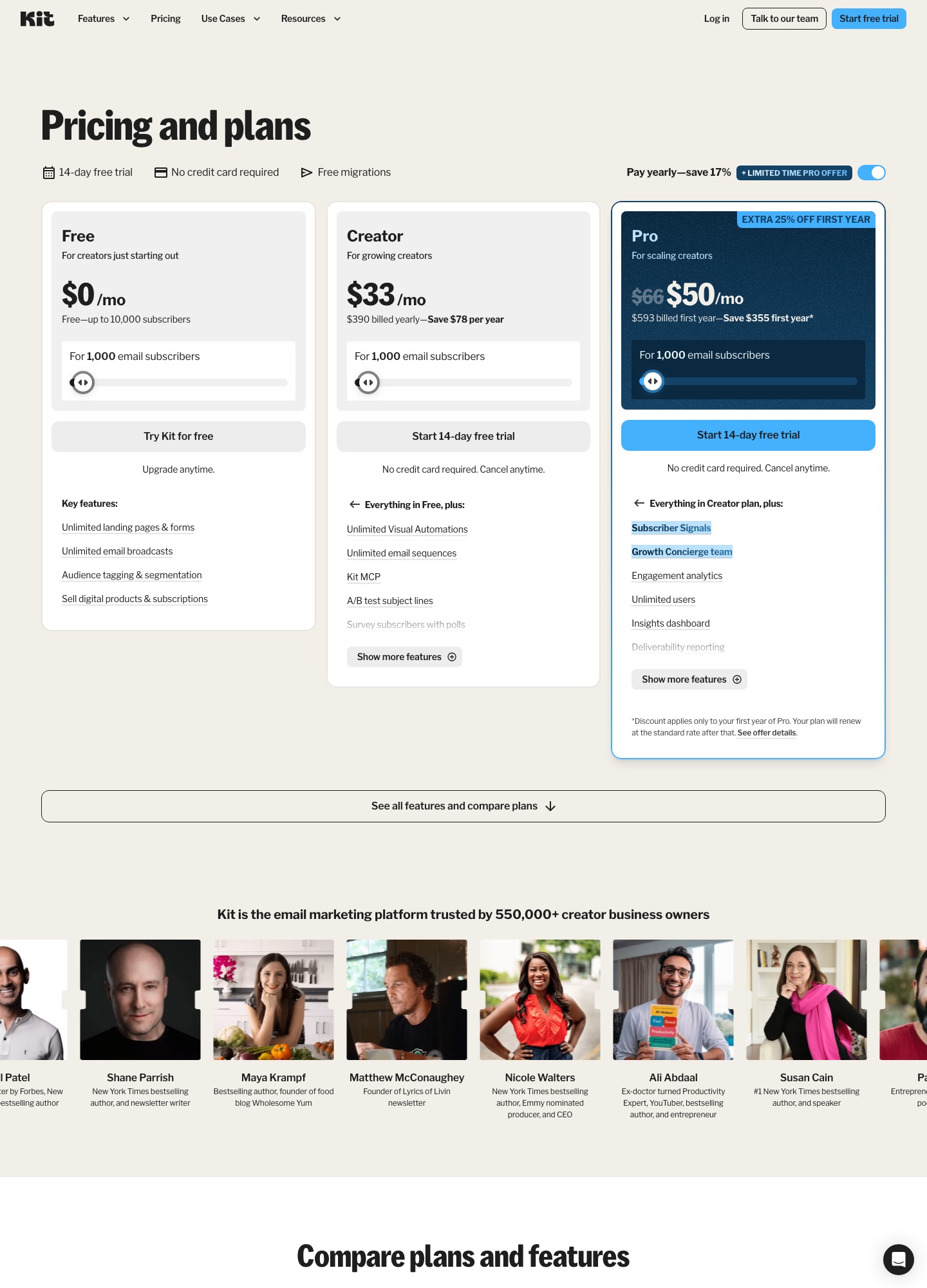
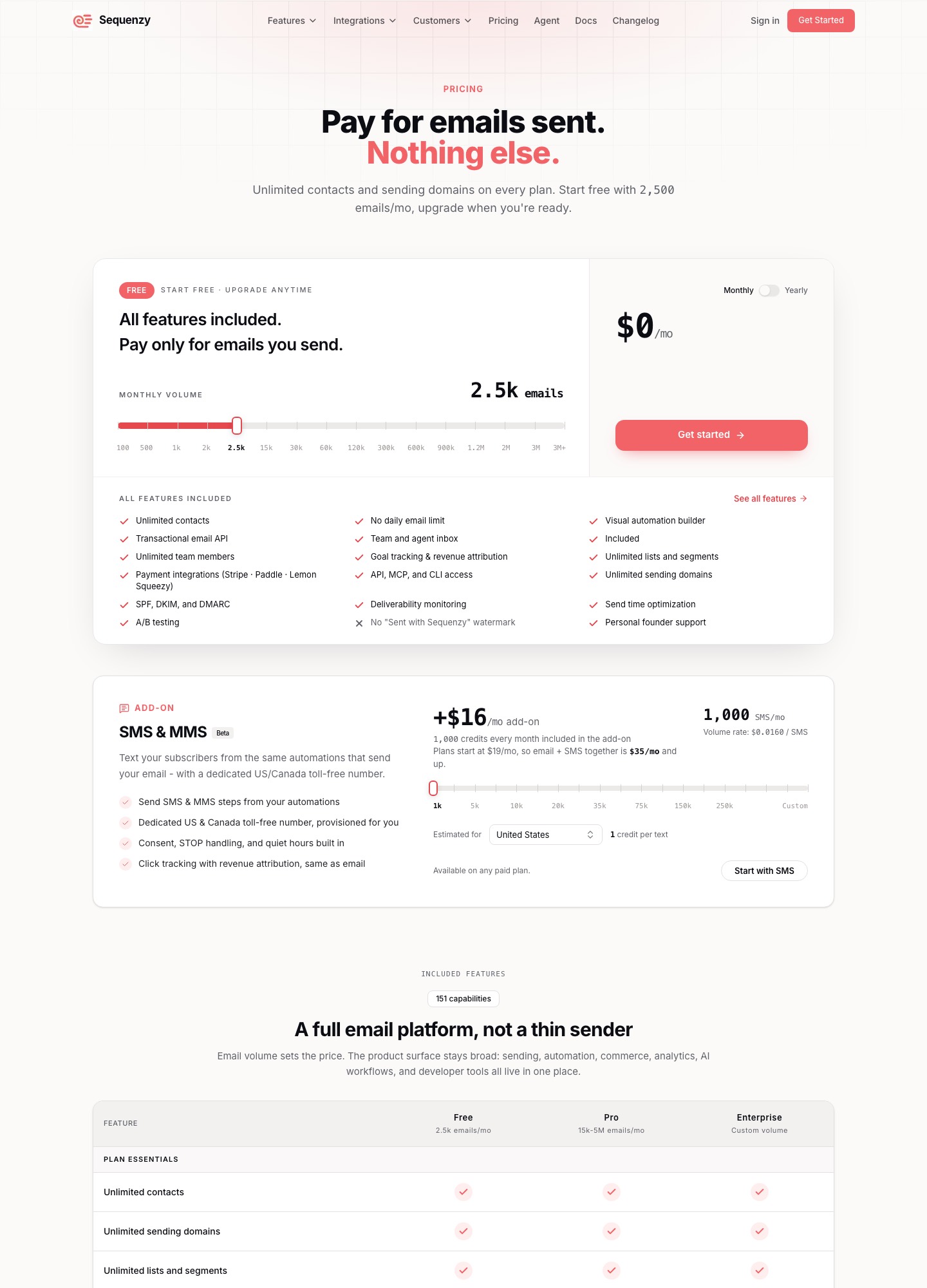
ConvertKit (now Kit) is for creators who sell content, courses or products to an audience: newsletter writers, course authors, podcasters. Sequenzy is for SaaS teams that bill through Stripe, Paddle or Lemon Squeezy and want payment and product events to start the emails. The deciding numbers: Kit's pricing page gives a free plan up to 10,000 subscribers but no sequences until Creator at $33 a month, while Sequenzy's pricing page charges by emails sent, with every feature on its free 2,500-email plan.
The two pricing pages side by side
| Sequenzy | Kit (formerly ConvertKit) | |
|---|---|---|
| Built for | SaaS teams billing through Stripe, Paddle or Lemon Squeezy | Creators selling content, courses or products to an audience |
| What you are charged for | Emails sent each month; contacts and sending domains are unlimited | Subscribers, in steps from 1,000 upward |
| Free plan | 2,500 emails a month, every feature included, no card | Up to 10,000 subscribers: landing pages, forms, broadcasts, tagging and segmentation; no sequences or Visual Automations |
| First paid step | 15,000 emails a month | Creator, 1,000 subscribers |
| What starts a sequence | Payment and product events: Stripe, Paddle, Lemon Squeezy, PostHog, webhooks | Visual Automations and sequences on Creator and Pro (the pricing page does not name the triggers) |
| Failed-payment email | Dunning flow on Stripe invoice.payment_failed with a card-update page | Not mentioned on its pricing page |
| Landing pages and forms | Not in the pricing-page feature list | Unlimited, including on the free plan |
| Selling products | Not in the pricing-page feature list | Digital products and subscriptions, including on the free plan |
| Trial and migration | Free plan instead of a trial | 14-day trial on paid plans without a card; free migrations |
The two pricing pages are different kinds of document. Kit's reads like a creator's shopping list: it counts people (subscribers), and its free plan is packed with things that grow an audience and sell to it. Sequenzy's counts messages, and its feature table is about what starts them. We priced both on one assumption, set out below, so the cost comparison is like for like.
Where Kit is the stronger tool
Kit wins on everything that happens before and around the email, and the free plan is the clearest case.
- A free plan that holds 10,000 subscribers. Kit's pricing page offers unlimited landing pages, forms and email broadcasts, tagging and segmentation, and selling digital products and subscriptions at no charge up to 10,000 subscribers. A writer who only sends issues to a growing list can stay at $0 for a long time.
- Landing pages and forms. Both are unlimited, even on the free plan. Sequenzy's feature list focuses on sequences, transactional email, attribution and integrations, so a creator would be building the signup page somewhere else.
- Selling to the audience. Digital products and subscriptions are sold from inside Kit. Kit's page also quotes a transaction fee for selling, so read that line before you count on keeping the whole sale price.
- Tagging built around people. Tags and segments describe what a reader signed up for or bought. That model suits a course launch or a newsletter with several reader interests far better than a billing-event model does.
- Free migrations. The page promises free migrations, and its comparison table says an in-house team rebuilds your forms, templates and automations, which takes the sting out of leaving another creator platform.
- A trial with no card. Paid plans come with a 14-day free trial and no credit card required.
One boundary matters when you read the free plan. Kit's page puts Visual Automations and email sequences on the Creator plan and above, so the free tier covers broadcasts, not a welcome series or a course drip. If your list needs a sequence, the real entry price is Creator, from $33 a month at 1,000 subscribers.
Where Sequenzy is the better fit
Sequenzy is the better tool when the thing that should trigger an email is money or product usage rather than a form or a tag.
- Payment events start flows. Sequenzy's pricing page lists Stripe, Paddle and Lemon Squeezy integrations on every plan, and its home page says each event starts the right flow for a segment built from plan, MRR and engagement data.
- Dunning email with a card-update page. When a Stripe
invoice.payment_failedevent arrives, Sequenzy's site says it starts a dunning email flow that points the customer to a card-update page. Deciding when Stripe or Paddle tries the card again is their job, not Sequenzy's. Kit's pricing page has no failed-payment emails on it, which matters if your creators sell subscriptions that can lapse. - Priced by emails, not people. Contacts and sending domains are unlimited on every plan, so a SaaS with a large, mostly quiet user base is not penalised for the size of its list.
- Every feature on the free plan. The free plan sends 2,500 emails a month and, per the page, has no feature gates and needs no card. A first sequence can be built and tested without paying, which is not true of Kit's free plan.
- Product-side extras. The pricing page also lists AI-generated sequences, a visual automation builder, goal tracking and revenue attribution, a transactional email API, and an SMS and MMS add-on at $16 a month with 1,000 credits.
What 1,000, 5,000 and 10,000 subscribers cost
The two vendors count different things, so a comparison needs one assumption. Ours: each subscriber receives 4 emails a month, which is a weekly newsletter or a sequence plus a broadcast. That is our assumption, not a figure from either vendor. With it, 1,000 subscribers send 4,000 emails a month, 5,000 send 20,000 and 10,000 send 40,000. Each send count then lands on a Sequenzy tier, while Kit's price depends only on the subscriber count.
| Subscribers | Sends at 4 a month | Sequenzy tier that covers it | Kit Creator | Kit Free |
|---|---|---|---|---|
| 1,000 | 1,000 x 4 = 4,000 | $19 (15,000-email tier; the free 2,500 is too small) | $33 | $0, broadcasts only |
| 5,000 | 5,000 x 4 = 20,000 | $29 (30,000-email tier) | $75 | $0, broadcasts only |
| 10,000 | 10,000 x 4 = 40,000 | $49 (60,000-email tier) | $116 | $0, broadcasts only |
All figures are dollars a month. Kit's Creator prices are the monthly rate shown with yearly billing: at 1,000 subscribers the page reads $33 a month, or $390 billed yearly, and says yearly billing saves $78 a year at that size. Sequenzy's tiers are its listed monthly prices; its page also lists yearly prices. Kit's Pro plan, which adds Subscriber Signals, unlimited users, deliverability reporting and a newsletter referral system, reads $66 at 1,000 subscribers (the page shows $50 as a first-year promotion), $158 at 10,000 and $233 at 25,000.
What the table says: if you need sequences, a 10,000-subscriber audience costs $116 a month on Kit Creator. Under our assumption the same audience fits Sequenzy's $49 tier. If you only need broadcasts, Kit Free at $0 beats every paid option, and Sequenzy's free tier stops at 2,500 emails, a quarter of a single send to 10,000 people. The comparison moves again with how often you mail, as the next section shows.
What changes with more or fewer emails per subscriber
Sequenzy's bill follows sends; Kit's follows subscribers and does not move when you mail more often. Here is the 5,000-subscriber audience at different frequencies, with Kit Creator held at its $75 reading.
| Emails per subscriber a month | Sends: 5,000 subscribers x emails | Sequenzy tier | Kit Creator |
|---|---|---|---|
| 1 | 5,000 | $19 a month, which is the 15,000-email tier | $75 |
| 4 | 20,000 | $29 (30,000 tier) | $75 |
| 8 | 40,000 | $49 (60,000 tier) | $75 |
| 12 | 60,000 | $49 (60,000 tier, exactly full) | $75 |
| 16 | 80,000 | $99 (120,000 tier) | $75 |
A creator who sends a daily email, about 30 a month, would send 30 x 5,000 = 150,000 emails, past the 120,000-email tier, which is the largest we read on Sequenzy's page. A list mailed that often is where a per-send price stops being the cheap one, and it is also the case where Kit's flat subscriber price helps most. At the other end, a SaaS whose users mostly get a few lifecycle emails stays inside the free 2,500 emails or the first paid tier even with a long user list, because Sequenzy does not count contacts. Kit prices the subscriber count, so list size alone sets that bill.
Which audience should pick which
Pick Kit if you sell to an audience
Newsletter writers, course creators and anyone selling digital products or paid subscriptions to their own readers belong on Kit. The free plan covers a list of up to 10,000 with landing pages, forms and broadcasts, and the paid step to Creator brings the sequences and Visual Automations a course funnel needs. If your signups come from a landing page and your segments are tags such as "bought the course" or "joined from the podcast", Sequenzy adds little that you would use. Our Kit alternatives page covers where to look if Kit's per-subscriber steps become the problem.
Pick Sequenzy if you run a SaaS
A product with subscriptions in Stripe, Paddle or Lemon Squeezy should look at Sequenzy first. Payment events can start the flow, a failed invoice triggers dunning email with a card-update page, and the bill follows emails sent rather than the size of the user table. The free plan is large enough to wire up a trial sequence and test it. For what such a sequence contains, read our guide to trial conversion email sequences and our notes on email tools with Stripe integration.
Use neither if your shop is the product catalogue
A creator who is really a store, with carts and orders rather than courses and subscribers, is outside both pitches. Neither pricing page we read is organised around ecommerce order data, and our Kit and Drip comparison looks at that case. A business that mostly needs a CRM and sales follow-up is also better served by a tool built around contacts and deals than by either of these two.
One more case sits in the middle: a creator who also ships a small software product. Run the audience in Kit for the landing pages and the product's paying users in Sequenzy for the billing triggers, and keep the two lists separate so a customer is never in both sequences at once. That doubles the places where unsubscribes must be honoured, so only split if both halves are big enough to justify it.
Moving between Kit and Sequenzy
From Kit to Sequenzy
Kit's own export article says a subscriber export includes first name, email address, created date, status, tags, location, attribution data and custom fields, and that you must choose "Select all" to export beyond the current page. The article describes a subscriber CSV; it does not list forms, landing pages or sequences, so plan to rebuild those. Export only confirmed subscribers, because Sequenzy bills by sends and sending to stale addresses spends them.
The real work is mapping. Kit tags describe interests and purchases; a billing-driven tool segments on plan, MRR and engagement. Before importing, write a table that converts each tag you still use into a plan or status: "bought the course" becomes a customer attribute, "free guide" becomes a lead. Then rebuild the welcome sequence first, with payment events from Stripe, Paddle or Lemon Squeezy as the new trigger, and leave the Kit account open until the first live send is confirmed. We have not confirmed a Sequenzy import tool for Kit exports, so assume a CSV upload and check its own documentation.
From Sequenzy to Kit
Going the other way, a SaaS that has grown into a content business exports its contacts and imports them into Kit, which says on its pricing page that migrations are free and that an in-house team rebuilds forms, templates and automations. Billing-triggered flows, such as dunning on invoice.payment_failed, have no counterpart on Kit's pricing page, so keep those where Stripe or your billing tool can still reach them. Sequences need Kit's Creator plan, so budget $33 a month at 1,000 subscribers rather than the free plan if you want sequences.
Frequently asked questions
Is ConvertKit the same thing as Kit?
Yes. The product formerly sold as ConvertKit now trades as Kit and its pricing lives at kit.com/pricing. Older articles and reviews still say ConvertKit, so a search for either name leads to the same vendor.
Can I run a newsletter business on Kit for free?
Yes, as long as broadcasts are enough. Kit's pricing page lists a free plan up to 10,000 subscribers with unlimited landing pages, forms and email broadcasts, tagging and segmentation, and selling of digital products and subscriptions. Visual Automations and email sequences begin on the Creator plan, so a welcome series or a course drip means paying from $33 a month at 1,000 subscribers.
Is Sequenzy cheaper than Kit for a SaaS product?
At the three sizes we priced, with our assumption of four emails per subscriber each month, yes. Sequenzy's tiers that cover 4,000, 20,000 and 40,000 sends are $19, $29 and $49 a month. Kit Creator reads $33, $75 and $116 at 1,000, 5,000 and 10,000 subscribers. The gap closes as you mail more often, because Sequenzy bills by emails sent while Kit bills by subscribers, so recompute with your own send volume.
Does Sequenzy have a landing-page builder and a store like Kit?
Among the features Sequenzy's pricing page lists (sequences, a visual automation builder, AI-generated sequences, a transactional email API, revenue attribution and many integrations) we found no landing-page builder and no product storefront. If your growth depends on signup pages and selling a course or ebook from the same account, Kit is built for that. A SaaS can pair Sequenzy with its own website forms instead.